How to File a Complaint on SMART ODR Portal: Complete Step-by-Step Guide


4800+ Disputes Registered in
SMART ODR in 2026

However, with the right procedure, it can be recovered.

Have You Been Scammed Too?

Get assistance in filing a Complaint Now!

Let’s help you report this!



    Here’s How We Will Help You.


    Comprehensive Case Evaluation

    Provide personalized guidance & best possible solution.

     

    Confidentiality and Security

    Keep all your personal information confidential & secure.

     

    End-to-End Support

    From filing to following up to responding, we provide comprehensive support.

     

    Proven Success Record

    Delivered positive outcomes in different types of cybercrime cases

     

    Fast and Efficient Process

    Our quick & efficient services provide maximum results in minimum time.
     

    What Is SMART ODR and Why Was It Created?

    SMART ODR meaning, in the simplest terms: it is where your complaint goes to actually get settled after SCORES has run out of road.

    The SMART ODR full form is Securities Market Approach for Resolution Through Online Dispute Resolution.

    It is SEBI’s structured dispute resolution platform at smartodr.in, built specifically for investors who have a grievance against a SEBI-registered intermediary and have not received a satisfactory resolution through the SCORES complaint process.

    Before SMART ODR existed, an investor whose SCORES SEBI complaint was closed without real resolution had only one formal path forward: exchange arbitration, which involves a more structured legal proceeding with strict documentation requirements.

    SMART ODR sits between SCORES and arbitration. It gives investors access to structured conciliation by an independent third party before committing to the more formal arbitration route.

    The platform is completely free for investors at the pre-conciliation and conciliation stages. Everything happens online.

    No physical presence is required at any stage.

    And it applies to disputes with all SEBI-registered intermediaries, including stockbrokers, research analysts, investment advisers, depository participants, and mutual funds.

    In its first year of operation, SMART ODR received over 7,500 complaints, reflecting strong and growing adoption across investor categories.

    When Can You Use SMART ODR?

    SMART ODR becomes available when your dispute with a SEBI-registered intermediary has not been resolved satisfactorily through the SCORES process.

    Either the intermediary did not respond within the 21-day window, or their response did not address your actual grievance, and you marked it as unsatisfactory.

    One important rule that investors frequently miss: if you file a dispute on SMART ODR while a complaint is still pending on SCORES, the SCORES complaint is automatically treated as disposed.

    And if you have filed on SMART ODR, you cannot subsequently file the same complaint on SCORES.

    This means the decision of when to move from SCORES to SMART ODR is a one-way door. Make sure the SCORES process is genuinely exhausted before filing on SMART ODR.

    The types of disputes the SMART ODR platform handles most commonly fall into four categories.

    • Fee recovery disputes, where a registered intermediary charged above the SEBI cap or collected fees informally.
    • Guaranteed return promise disputes, where SEBI Regulation 16(b) was violated.
    • Unauthorised transaction disputes, where trades were executed without your consent.
    • Service delivery disputes, where what was delivered differed materially from what was contracted.

    How to File a Complaint on SMART ODR Portal?

    Filing runs in six steps, and the first one is an account, not a complaint.

    Get the registration right, and the rest of the form fills itself from records already tied to your PAN.

    Step 1: SMART ODR Registration

    SMART ODR registration takes about five minutes, and it is the one step that cannot be delegated to anyone else.

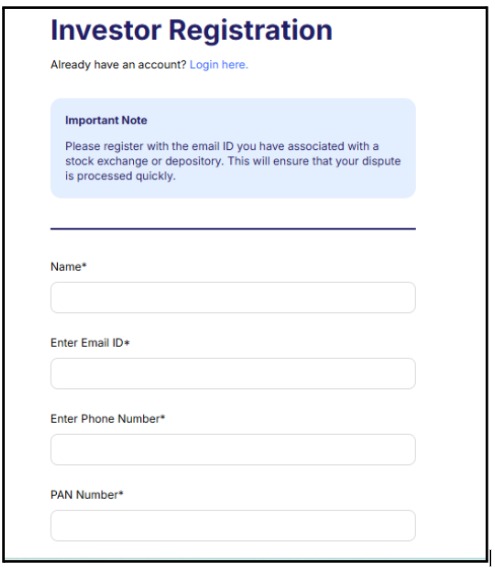
    SMART ODR registration form page on the official portal showing investor registration fields

    The SMART ODR portal identifies you by PAN.

    That single field is what links your new account to your existing SCORES complaint history and to your securities records held with the KYC registries, which is why the PAN you register with has to be the same as the one on the trading or demat account the dispute concerns.

    Have three things ready before you open the registration form.

    • Your PAN card, matching the account the dispute relates to.
    • A mobile number you can access right now, because verification runs on OTP and the code expires.
    • An email address you check, since every case notification from the platform lands there.

    One thing worth knowing before you register: the SMART ODR platform will not take a dispute from an account whose PAN does not match the SCORES complaint on which it is built.

    If you filed on SCORES under a family member’s PAN, register on SMART ODR with that same PAN, not your own.

    Registration itself does not file anything. It creates the account.

    The dispute is a separate step, covered below.

    Step 2: SMART ODR Login

    Filing is not the end of your involvement. SMART ODR login is how you stay in the case, and cases stall when investors treat submission as the finish line.

    Log in at smartodr.in with the PAN and password you set during registration.

    An OTP goes to your registered mobile each time. Your dashboard opens on the case list.

    What the dashboard shows you: the current stage, the date of the last update, anything the intermediary has submitted, any message from the conciliator, and the next action required from you.

    Log in twice a week while your case is active.

    Email notifications from the platform have a habit of landing in spam.

    If you rely on email alone, you will miss a conciliator’s document request, and a missed response window slows the case more than anything the other side does.

    If you cannot get in, the reset runs on the mobile number you registered with.

    Where that number has changed, the helpdesk needs your case reference number and PAN to restore access, which is slower than it sounds, so update it before you need it.

    Step 3: Link Your SCORES Complaint

    When filling out the dispute form, you will be asked to provide your SEBI SCORES complaint reference number.

    This is the unique number you received when you first filed on SCORES.

    Enter it exactly as it appears in your SCORES account.

    This number links your existing SCORES complaint record to the new SMART ODR case and ensures the full complaint history transfers automatically.

    Step 4: Select The Correct Intermediary Category and Enter Dispute Details

    Select the intermediary type that matches the entity you are filing against.

    The categories available are:

    • Research Analyst: Select this for complaints against SEBI-registered research analyst firms. Enter the firm’s INH registration number. This applies to advisory firms providing stock tips, intraday calls, or research reports through subscription models.
    • Investment Adviser: Select this for complaints against SEBI-registered investment advisers. Enter the firm’s INA registration number. This applies to entities providing personalised investment advice based on your financial goals and risk profile.
    • Stockbroker: Select this for complaints involving unauthorised trades, excess brokerage, margin call disputes, failure to transfer securities, or platform technical glitches that caused financial loss. Enter the broker’s SEBI registration number.
    • Mutual Fund: Select this for complaints about delayed redemption, incorrect NAV application, or mis-selling of fund schemes. Enter the fund’s AMFI registration number.
    • Depository Participant: Select this for complaints about demat account operations, including failure to dematerialise securities, incorrect transaction recording, or failure to execute account instructions.

    In the dispute details field, describe what happened in factual, chronological order.

    Date of first contact. What was promised. Date of payment. Amount paid.  What was delivered? What specifically went wrong? When you raised the issue internally. What response did you receive? What resolution are you seeking?

    Keep the language factual and specific.

    Step 5: Upload Supporting Documents

    Upload your evidence in the accepted formats. PDF files for multi-page documents such as account statements, contract notes, and email correspondence. J

    PG or PNG files for screenshots of WhatsApp messages, SMS records, or social media communications. Ensure each file is within the size limit.

    Compress large PDFs before uploading. Name each file clearly before uploading so the conciliator can identify documents without opening each one.

    The minimum documents to upload at this stage are your SCORES complaint reference confirmation, the intermediary’s SCORES response or evidence of non-response, your payment receipts, your subscription agreement or account opening form, and the specific communication showing the violation, such as a WhatsApp guarantee message or a contract note for an unauthorised trade.

    Step 6: Submit and Track

    Click Submit. Save your SMART ODR case reference number from the confirmation screen.

    This is different from your SCORES reference number and is your primary tracking identifier on SMART ODR from this point forward. Check your dashboard regularly for updates.

    The intermediary will receive a formal Notice to the Opposite Party and has a defined response window after which the conciliation process begins.

    What Happens After You File SMART ODR Dispute Resolution?

    After submission, an independent conciliator is assigned to your case from SEBI’s empanelled list.

    This conciliator is not a SEBI employee.

    They are an independent professional who facilitates structured dialogue between you and the intermediary.

    The process has two stages.

    Pre-conciliation is an online structured negotiation where both parties submit their positions and attempt to reach an agreement.

    Many disputes settle here without needing a formal conciliator session.

    Formal conciliation follows if pre-conciliation does not produce agreement. The assigned conciliator takes an active role, facilitating sessions and proposing settlement terms.

    If conciliation at both stages fails, the matter moves to formal arbitration where an arbitrator reviews all evidence and issues a binding award.

    For claims below Rs. 10 lakh, there is no investor filing fee for arbitration.

    For the complete guide on what happens at each stage of conciliation, including timelines, what the intermediary is required to do, and how to track your case status, the detailed process guide covers everything. 

    Investors Who Recovered Money Through SMART ODR

    The following two case studies highlight how our team successfully guided investors through the SMART ODR and arbitration process to secure legally binding resolutions

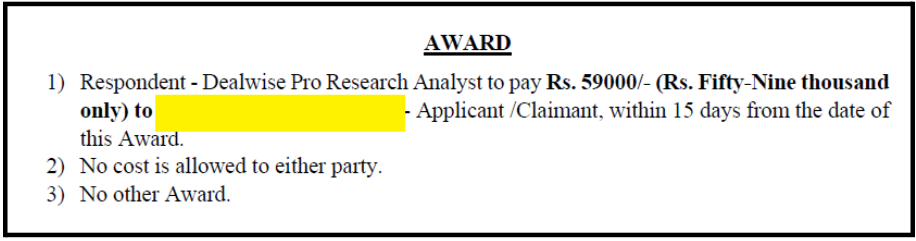
    Case 1: Rs. 59,000 Recovered from Dealwise Pro

    An investor paid Rs. 84,000 in fees to the Dealwisepro company after it made loss-recovery and high-profit assurances.

    After trading losses appeared, the firm continued to pressure the investor to add capital rather than address the service failure.

    The investor’s WhatsApp messages documented the recovery promises.

    The payment receipts showed the fee amounts. The trading statement showed the losses that existed at the time the promises were made.

    After the matter was taken through SEBI SCORES, SMART ODR, and escalation, the investor received a binding refund award of Rs. 59,000.

    The proceedings also placed on record concerns about guaranteed return promises and the firm’s failure to disclose its fee structure before collecting payments.

    dealwisepro penalty

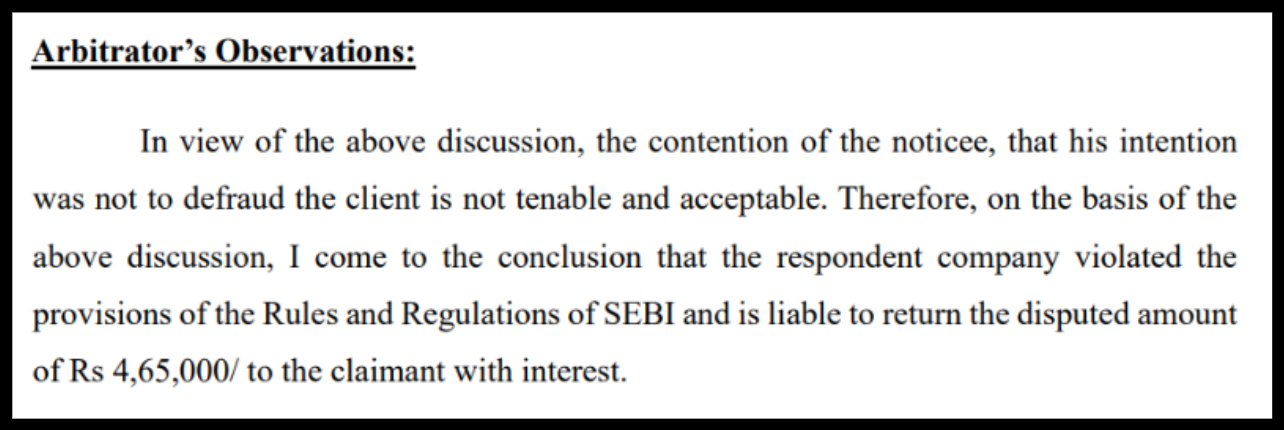
    Case 2: Rs. 4,65,000 Recovered from NiftyPro Trading Research

    Chand Ansari paid Rs. 55,000 to NiftyPro Trading Research, operated by Sameer Pandey, after being offered a profit-sharing arrangement.

    What was described as profit-sharing was later claimed by the firm to be a service fee after the trades went against him.

    His total loss was Rs. 4,65,000.

    Our team advised Chand to file for arbitration. The hearing took place on March 24, 2025.

    The key evidence was an audio recording where the profit-sharing terms were discussed, SEBI’s existing penalty order against Sameer Pandey for Rs. 2 lakh dated December 24, 2024, documenting the same violations, and Chand’s consistent factual account.

    On April 29, 2025, Arbitrator Amar Sinha issued the award directing NiftyPro to refund Rs. 4,65,000 with 15 percent annual interest if payment was not made within one month.

    Niftypro trading arbitration award

    Both cases illustrate the same principle. The evidence collected before filing, organised clearly, and presented consistently through the process is what determines the outcome.

    Cases where documentation is complete from the start move faster and produce better results.

    Get assistance to register complaint in SMART ODR


      Frequently Asked Questions

      SCORES is a complaint filing and monitoring portal where you file first. The registered intermediary receives a formal direction to respond within 21 days. SMART ODR is the dispute resolution platform you use after SCORES. An independent conciliator facilitates structured mediation between you and the intermediary and produces a binding settlement or arbitration award. SCORES creates the record. SMART ODR resolves the dispute.

      Generally no. SMART ODR requires a prior SCORES complaint as the basis for most disputes. However, if you file on SMART ODR while a SCORES complaint is still pending, the SCORES complaint is automatically treated as disposed. And once you file on SMART ODR, you cannot file the same complaint on SCORES again. The decision to move to SMART ODR is one-directional.

      Yes. Pre-conciliation and conciliation on SMART ODR are completely free for investors. For formal arbitration, investors with claims below Rs. 10 lakh pay no filing fee. Nominal fees apply for larger claims on a slab basis.

      Pre-conciliation typically runs for 2 to 4 weeks. Formal conciliation adds another 4 to 8 weeks if pre-conciliation does not settle the matter. If the matter goes to arbitration, the overall timeline from SMART ODR filing to a binding award typically falls between 3 and 9 months. Cases with complete, well-organised documentation from the start move significantly faster.

      If both pre-conciliation and formal conciliation fail, the dispute moves to formal arbitration. An arbitrator reviews all submitted evidence and issues a binding award. The intermediary is legally required to comply. For claims below Rs. 10 lakh, the investor pays no arbitration filing fee.


      loader

      FraudFree Support

      We're online — reply instantly
      Scroll to Top