When Sharekhan login fails, it feels personal. Like the app is choosing violence today, right?
But most login issues are predictable. And they usually have a fix.
This blog covers what users report. Plus what Sharekhan itself recommends. And how to complain if it gets serious.
Sharekhan App Not Working Today
“When the Sharekhan app isn’t working, don’t assume the broker is down right away. First, check these three basics, because in 6 out of 10 cases, the issue lies there.”
- App update pending?
- Phone storage full?
- Network switching between Wi-Fi and mobile data?
Also, some days feel “global outage-ish.” Cloud disruptions have hit many platforms before. So if multiple apps feel slow, it’s not just you.
Sharekhan Login Not Working
A lot of users say, “My password is correct, but I still can’t log in.”
Sounds familiar?
Sharekhan has an extra security step.

Website and TradeTiger logins also use OTP. So if OTP doesn’t arrive, login feels “broken.” But it’s actually stuck at verification. If OTP fails repeatedly, wait a bit.
Some systems throttle attempts for safety. You’ll see that on many broker logins.
Sharekhan Login Problems
Now let’s talk about real user frustration because this is where the pain actually sits.
On Google Play Store, some users report they’re “not able to log in” even after trying fixes.
Others complain the app keeps showing “initializing.” And in some cases, it won’t work for hours.

The real concern during these lockouts is security.
Investors are increasingly worried about their funds being moved without their knowledge, especially after seeing reports of Sharekhan’s unauthorised trading and similar breaches on other platforms.
When you can’t log in, that lack of visibility is what causes the most stress.
When a broker says “reinstall the app,” users get irritated for a reason, because it feels like a copy-paste answer.
Also, if you’re already logged in elsewhere, your new login may behave oddly. And sometimes it’s simply an issue with the app build.
What to Do If You Are Facing Sharekhan Login Issues?
If you want a simple order of actions, do this:
1. Start with basic checks
- Start with airplane mode on/off.
- Then restart the phone.
- Then update the app.
2. Check platform access
- Next, try logging in on the web portal.
- If the web works, the app is the problem.
- If both fail, it may be account- or security-related.
3. Verify login method
- If OTP is the blocker, try TOTP.
- Sharekhan documents OTP/TOTP login flow.
4. Avoid repeated attempts
- And if nothing works, stop retry-spamming.
- Multiple wrong attempts can trigger cooldowns.
How to Report Sharekhan Login Issue Properly?
If the login issue impacted trades, don’t just call and forget.
Raise a ticket, and keep the ticket ID. Sharekhan’s complaint process says email support first, and you’ll get a Ticket ID.
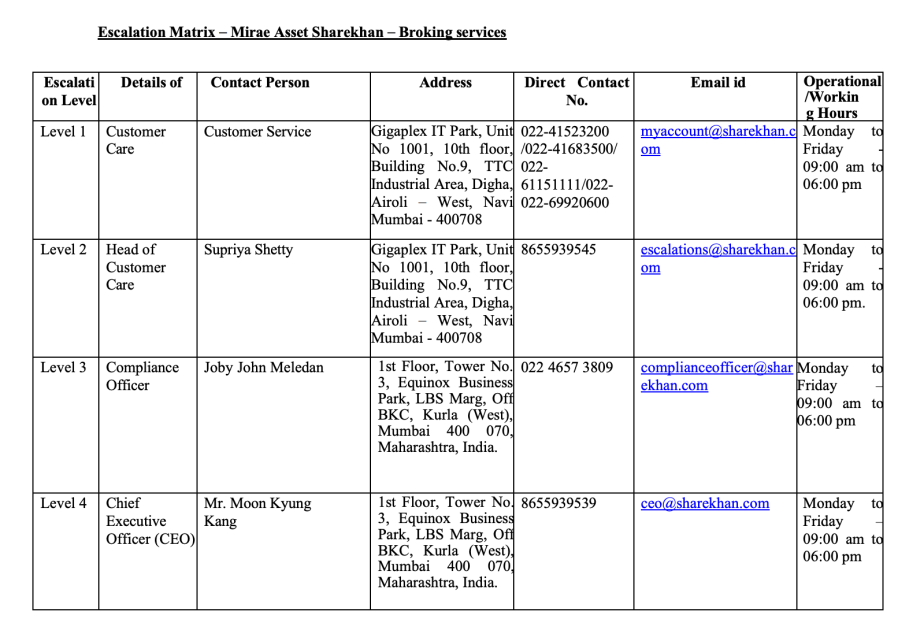
They also publish escalation contacts in PDFs. The escalation matrix lists phone and email channels.
And the investor grievance contact points list includes emails such as [email protected] and [email protected], plus phone numbers for grievance support.
What Evidence to Keep?
- Take screenshots immediately if login fails during market hours, even if it feels unnecessary.
- Capture the full error screen clearly.
- Note the exact date and time of the issue.
- Save any OTP failure messages shown.
- If an order was affected, record the order ID and all failed attempts.
- This turns “my app broke” into documented proof of what went wrong.
Need Help?
If your Sharekhan login issue caused loss, or if the disruption led to unexpected trades, you don’t have to handle it alone.
We’ll help you organise proof and timelines. Then we’ll guide you through the proper escalation steps.
Conclusion
A Sharekhan login problem is usually fixable.
Often, users complain about OTP delays, session restrictions, or app stability issues.
If it’s urgent, try logging in via the web first. If it impacted money, file a ticket.
And always keep screenshots while it’s happening.