You open Viralo TV to catch some quick Hindi micro-shows or maybe earn a little extra cash by watching reels.
Sounds harmless, right?
But for many users, ₹499 has mysteriously disappeared from their accounts, and there’s no sign of the promised rewards.
The app is hugely popular on the Play Store, boasting over a crore downloads and a shiny 4.8-star rating.
On the surface, it looks like India’s go-to app for short entertainment.
But behind the scenes, users are reporting sneaky “trial” subscriptions turning into automatic payments, and canceling doesn’t always stop the charges.
So, is Viralo TV just a fun streaming app, or a clever money trap hiding behind all those reels?
Let’s dig into what’s really happening.
Viralo App Review
Viralo TV is a popular Indian entertainment app that lets users watch short Hindi micro-shows, reels, and bite-sized videos.
Marketed as a fun way to pass the time and sometimes even earn rewards, it has quickly gained millions of downloads and high ratings on the Play Store.
But despite its entertaining promise, users have started noticing unexpected charges.
Now, at first glance, losing ₹499 might seem harmless, but many users shrug it off and never report it.
After all, it’s a small amount, and the app still lets you watch reels and short shows.
But ignoring it can be risky.
Small, unnoticed deductions can quickly turn into recurring charges, and what starts as a minor loss may signal deeper subscription traps.
That’s why even a seemingly minor ₹499 deduction should never be ignored.
Is Viralo App Legit?
When you check Scamadviser, Viralo.com gets a “relatively high score,” which might make it seem trustworthy.
On paper, the company behind it, Azalp Technologies Private Limited, looks legitimate.
It was incorporated in December 2021, has around 43 employees, and reportedly earned ₹21.9 crore in FY 2024.
But despite these official records, many users report troubling experiences with unexpected charges and confusing billing.
So the question remains: can Viralo TV really be trusted?
Is Viralo App Safe?
If you are thinking of downloading the Viralo app, then before clicking on any button, take a minute to consider the risks associated with the platform, so that you can decide Viralo app is aafe or not.
- Unauthorised AutoPay Activation
According to Google Play Store reviews, numerous users experienced surprise charges:
Users have reported that the ₹2 trial on Viralo TV automatically enables AutoPay without clearly informing them.
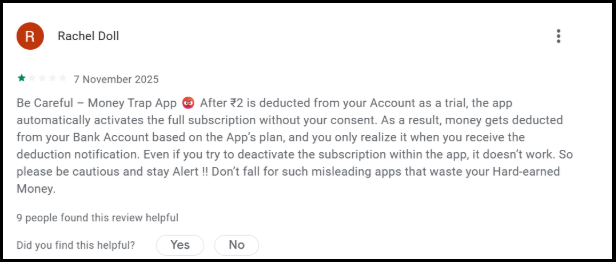
One reviewer on the Google Play Store said that the app offers a ₹2 one-day trial but then automatically activates autopay, making it very difficult to cancel.
They added that they did not find the content interesting or enjoyable, felt it was not worth ₹499, and described the app as feeling like a scam.
2. Charges After App Deletion & Subscription Cancellation
Multiple users report charges continuing even after uninstalling the app and cancelling subscriptions.
According to App Store reviews:
“I subscribed to their ₹2 trial plan, but later ₹499 was deducted from my account without any prior notice or consent through AutoPay, even after cancelling the subscription & app deletion.”
According to another Google Play user:
“I activated the trial but uninstalled the app after not liking it much, but I forgot to deactivate autopay. I reported it just a few minutes after the money was deducted, and they refused to refund it.”
3. Customer Support Non-Responsive
Users consistently report an inability to reach customer support.
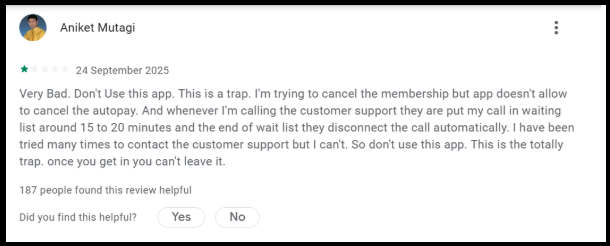
A user reported that the app prevents them from cancelling the autopay and that customer support is unhelpful, keeping calls on hold for 15–20 minutes before disconnecting.
Despite repeated attempts, they were unable to get assistance.
4. Refund Requests Denied
According to App Store complaints:
“Beware of this app! I accidentally purchased a subscription for ₹499 and immediately requested a refund, but the developers ignored my requests and kept my money. There’s no customer support, and the app’s refund policy is a complete lie.”
How to Report Viralo App Fraud?
1. Collect Evidence
Before reporting, gather:
- Screenshots of suspicious messages, pop-ups, or transactions.
- Payment receipts, if you made any transactions.
- App details: version, download source (Google Play Store, website, etc.).
2. Report to Google Play Store / App Store
If you downloaded the app from an official store:
- Google Play Store:
- Go to the app page.
- Scroll down, click on Flag as inappropriate, Harmful or fraudulent and submit details.
- Apple App Store:
- Go to the app page.
- Tap Report a Problem and select Fraud or Scam to submit details.
3. Report to Indian Authorities
- File a Cyber Crime Complaint:
- Go to Cyber Crime portal.
- Click “Report Cyber Crime” and select “Fraud” or “Financial Fraud” then submit details.
- Local Police:
- File a FIR (First Information Report) at your nearest police station. Bring all evidence.
4. Notify Your Bank / Payment Provider
If you made any payments:
- Contact your bank or payment service immediately.
- Ask them to block transactions or reverse unauthorised charges.
Need Help?
Has Viralo charged you ₹499 without proper consent? You’re not alone – hundreds of Indian users are facing identical issues.
Register with us if you are facing this issue.
Time is critical – the company’s policy requires complaints within 3 days of the transaction. Don’t let this window close.
Conclusion
Viralo TV operates as a registered Indian company and delivers legitimate content, which puts it in a kind of legal grey area rather than being an outright scam.
That said, there’s strong evidence of predatory billing practices designed to trap users into unwanted subscriptions.
The way the ₹2-to-₹499 conversion works, combined with unclear AutoPay disclosures, unreachable customer support, and blanket refund denials, fits the definition of an unfair trade practice under the Consumer Protection Act, 2019.
Our advice?
If you haven’t signed up yet, it’s best to steer clear of the trial offer altogether.
And if you’ve already been charged, don’t wait; pursue refunds through all available channels, including consumer forums and cybercrime portals.
Protecting yourself and your money should always come first.