
Quick Summary
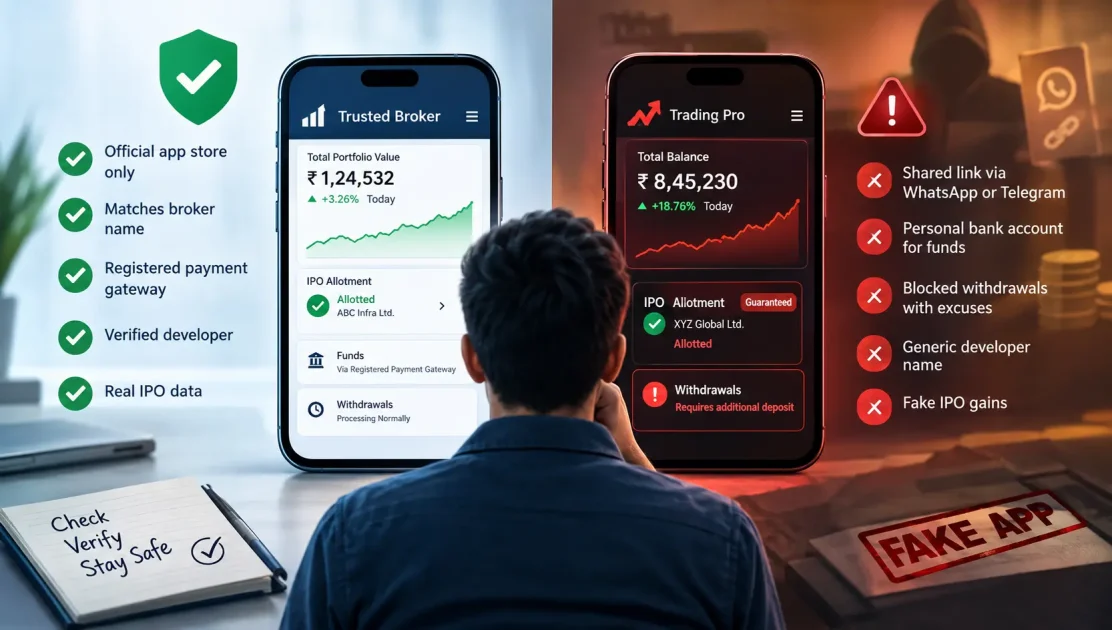
Clone trading apps mimic the interface and branding of well known, legitimate platforms. Victims are told to transfer funds to personal or third party bank accounts, not through the app itself. Fake apps show manipulated balances and profits that were never real trades. This checklist covers exactly how to confirm an app is genuine before you download or fund it.
One woman lost Rs 13 lakh. One man lost Rs 11.5 lakh. Same scam, same fake app, same pattern.
Both were shown rising balances and glowing IPO allotments that never actually existed.
When they tried to withdraw, the excuses started: low credit score, unpaid tax, one more required deposit.
Before you tap download on the next app someone sends you, run this checklist.
Genuine App vs Clone App: The Tells
| Signal | Genuine Broker App | Clone App |
| Download source | Official Play Store or App Store only | Shared link via WhatsApp or Telegram |
| Fund transfer | Routed through registered payment gateway | Requested to a personal bank account |
| Withdrawal experience | Processes normally, standard timelines | Blocked with rotating excuses |
| Developer listing | Matches the broker’s registered name | Generic, mismatched, or unverifiable |
| IPO allotment claims | Verifiable through your actual broker | Suspiciously large, unverifiable gains shown |
The Trading App Verification Checklist
Confirm every point below before you download an app or transfer a single rupee into it.
- Download source: Install only from the official Play Store or App Store, never through a shared link.
- Broker name match: Confirm the app is published by the same entity listed as your SEBI registered broker.
- Fund transfer destination: Money should move only through the app’s own registered payment gateway, never to a personal account.
- Developer details: Check the app store listing’s developer name against the broker’s official registration.
- Withdrawal test: Attempt a small withdrawal early, since fake apps often block or delay this from day one.
- No group invite installs: Be suspicious of any app you were asked to install specifically to join a WhatsApp or Telegram group.
- Reviews and ratings check: Look past star ratings, since fake apps often carry inflated or bought reviews.
How the Scam Actually Plays Out
This exact pattern, including the excuses used to block withdrawals, is documented in increasing cases of clone trading apps.
1. The introduction: fake profit screenshots are shared in a group chat or by an individual contact.
2. The download: you’re guided to install an app that looks convincingly like a genuine trading platform.
3. The illusion: your dashboard shows steadily rising balances and impressive IPO allotment gains.
4. The block: a withdrawal attempt triggers a demand for tax, a fee, or a “compliance” deposit.
5. The disappearance: further payments still don’t release funds, and contact eventually goes silent.
Red Flags Once You’ve Started Using an App
A sudden requirement to pay tax or a fee before withdrawal is the clearest sign of a clone app.
A simple side by side comparison method is explained in is your trading app real or fake, covering how to spot the copy.
Stop using the app immediately once any withdrawal excuse appears, regardless of how reasonable it sounds.
Bottom Line
A five minute source check before downloading beats months of chasing a withdrawal that never comes.
Explore more verification checklists, including for brokers and advisers, through report investment fraud in India on Fraud Free.
If you’ve already been trapped by a fake platform posing as a registered entity, you can report a fake SEBI registered platform through the correct route.
Report. Recover. Stay Fraud Free.
Frequently Asked Questions
They copy the branding and interface of legitimate trading platforms closely. Victims are shown fake rising balances and profits, then asked to pay a tax or fee before any withdrawal is allowed, which never actually happens.
No. Always install trading apps only from the official Play Store or App Store. Links shared through WhatsApp or Telegram groups are a common way clone apps are distributed to unsuspecting investors.
A genuine broker's app routes funds through a registered payment gateway tied to your trading account. A request to transfer money to a personal or third party account is a clear sign of a scam.
Attempt a small withdrawal early, before investing significant funds. Clone apps often block, delay, or invent excuses for withdrawals from the very first attempt, revealing the scam quickly.
Stop all further transfers immediately and document every transaction and chat. File a complaint with the National Cyber Crime Reporting Portal, since most clone app operators are unregistered entities.
Yes. Some clone apps display fabricated IPO allotment gains that never actually occurred. Always verify any IPO allotment independently through your genuine, registered broker account.


 Add us as a preferred source on Google »

