

Quick Summary
A trader sold an index put option intraday and closed it at a profit. His broker’s platform then failed to execute or cancel three exit orders and told him he held no position. Overnight those orders became a 72 lot carry forward position on expiry day, which he had never placed. It cost him ₹1,43,254.80 plus charges. After a formal legal notice and direct talks with the broker’s compliance team, he recovered the full ₹1,50,803.
You close a trade at a profit and call it a day. The next morning, you open your account and find a 72-lot position you never placed, sitting there on expiry day with no hedge.
That is what happened to Dhruv Kapadia (name changed) from Surat, Gujarat.
His broker’s app had shown him contradictory screens all day, and the helpline kept telling him to wait.
Here is how it played out, and how we got his full ₹1,50,803 back.
How One Exit Order Turned Into Three Ghost Orders on a Broker App?
Dhruv sold 24 lots of an index put option as an intraday trade, protected by a bought hedge. Both trades showed as executed.
When the position reached his target, he gave one instruction: exit the short.
That exit never went through cleanly.
His Open Orders screen began showing three intraday buy orders for the same contract, each marked 0 of 24 lots, at slightly different prices.
Trading App Order Cancellation Failed, Orders Still Showing as Open
Dhruv tried to cancel the three orders. The app first replied that cancellation had failed and to try again later.
A refresh then showed no open orders and no positions at all. Another refresh brought all three orders back.
Later, he tried to modify them. The app confirmed a new limit price of ₹1. It confirmed multiple cancellations.
After every confirmation, the same three orders sat in his list.
Anyone seeing confirmations that contradict the screen can start a broker technical glitch complaint, since screenshots of each conflicting message become the core evidence.
Broker App Showing Different Order Status in Two Tabs
At 11:41 in the morning, the order history marked two of these orders as rejected, citing an internal risk error and showing no exchange order number.
In the same minutes, the Open Orders tab still listed them as pending.
Dhruv closed his short himself at 12:51 pm, booking a profit of ₹26,301.60. The positions screen showed the contract as closed.
The three phantom orders stayed live.
How Did a Zero Position Become a 72 Lot Carry Forward Position Overnight?
After the intraday square off time, the app showed zero positions. A secure exit request returned a message saying no open positions existed.
His margin showed nothing blocked.
Dhruv called the helpline eleven times that day, over two hours in total, and wrote to the broker as well. He was told to wait because intraday orders could not survive past market close.
At about 8:30 the next morning, his account showed a carry forward long position of 72 lots, bought at an average of ₹48.47.
The contract expired that same day. His hedge had already been sold, so the position stood unprotected, with an open loss near ₹76,000.
He never placed a carry forward order. He never placed an order for 72 lots.
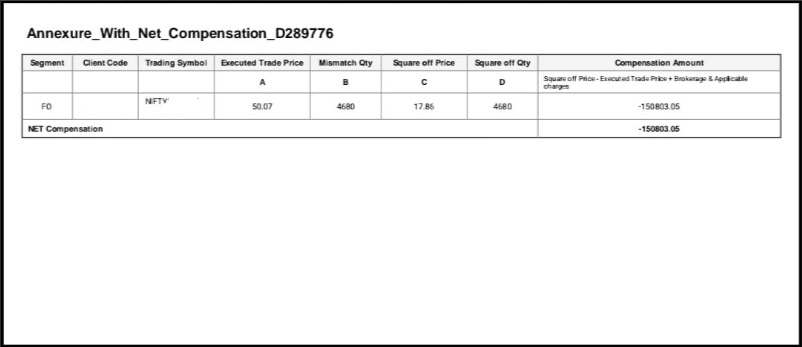
He closed the position at the first chance, selling at ₹17.86 for a loss of ₹1,43,254.80.
Broker’s Admission of a Technical Glitch and Refusal to Compensate
On a recorded call that morning, a supervisor told Dhruv the orders were intraday and should have squared off automatically.
She called the problem on the broker’s side a temporary technical issue. She also said his product type had not changed, though his own screen showed it as carry forward.
The broker’s written reply admitted a technical issue had caused difficulty placing or cancelling orders.
It then refused any compensation for losses arising from it.
That reply missed the actual complaint.
Dhruv’s loss came from a position the system created, not from trouble placing an order.
How We Turned Contradictory App Screens Into a Documented Claim?
The broker’s own platform produced the best evidence in this case.
Every conflicting message was already timestamped on screen.
Step One: We Built a Minute by Minute Timeline
Order history, positions, open orders, and cancellation confirmations were arranged side by side.
The contradictions between tabs became visible at a glance.
Step Two: We Matched the Price Gap to the Phantom Orders
The rejected orders traded near ₹48.5 that morning. The carry forward position carried an average of ₹48.47.
That match tied the overnight position to the orders the app had called rejected.
Step Three: We Quoted the Broker’s Own Admission Back to It
The supervisor’s recorded words and the written reply admitting a technical issue were placed together.
A broker cannot call a malfunction temporary and then deny it caused any loss.
Step Four: We Demanded the Mandatory Glitch Records
Our notice asked for the incident intimation to the exchanges, the preliminary report, and the root cause analysis the Master Circular requires after a technical glitch.
We also demanded that call recordings and system logs be preserved.
Step Five: We Claimed Charges Along With the Trading Loss
The claim covered the loss on the unplanned position plus every rupee of brokerage and levies debited on it, so the refund would leave Dhruv whole.
Step Six: We Pressed the Compliance Team Directly
With the notice served and the evidence laid out, we engaged the broker’s compliance team and held the position that this was a system-created trade, not a client loss.
How Much Did the Broker’s Compliance Team Finally Refund?
Dhruv’s claim stood at ₹1,50,803.
After the legal notice and sustained engagement with the compliance team, the broker agreed to refund the full amount.
Dhruv recovered ₹1,50,803, one hundred percent of what he claimed.
Broker App Showed One Thing and Did Another? Our Team Can Help
Dhruv’s case turned on screenshots taken in the moment. If your platform ever confirms a cancellation that did not happen, record your screen right now, note the time, and keep every message.
Register with us and we will take it from there.
Conclusion
A trading platform is meant to give a client one consistent truth about orders and positions.
Dhruv’s app gave him three: a rejected order, a pending order, and finally a 72-lot position he never requested.
Each contradiction was timestamped, which is why the case did not depend on his word against the broker’s.
The lesson for anyone facing a glitch is to capture the screens while the problem is happening, then match the later loss back to those moments.
A broker that admits a technical issue in writing has already conceded the cause, so a refusal to compensate rests on a distinction the facts do not support.
Report. Recover. Stay Fraud Free.
No. A change of product type needs your instruction. A conversion you never requested is a ground for a complaint. Record your screen, note exact times, and save every confirmation message. Contradictions between tabs are strong evidence. Not automatically, but the admission helps. It concedes a malfunction existed, so the argument shifts to what that malfunction caused. Ask for order logs, exchange confirmations, product type conversion records, call recordings, and the technical glitch reports the Master Circular requires. Yes. Charges debited on the unplanned position belong in the claim so the refund covers the full impact.Frequently Asked Questions





 Add us as a preferred source on Google »

