

Quick Summary
Trust wallet scams rarely break into the wallet itself. Scammers copy the brand instead, through cloned apps, fake support chats, urgent security emails and refund forms. Trust Wallet says it never asks for your recovery phrase, private key or password, so anyone who does is an impersonator. This page covers how each trick works, how to spot it, what to do if you already shared your phrase, and where to report the loss in India. Skim it before you tap any link.
You get a message saying your Trust Wallet needs urgent verification. Or a friendly stranger offers to fix your stuck transaction.
Most trust wallet scams begin exactly like this. Nobody hacks your phone.
The scammer borrows a name you trust, adds a little panic, and waits for you to type twelve words into the wrong box.
Here we go through every trick we see, starting with the one that catches the most people.
Trust Wallet Impersonation Scams
Impersonation is the most common way people lose money around Trust Wallet.
The scammer pretends to be the app, the support team, or the security desk.
This section covers four versions, from cloned apps to refund forms.
Find the one that matches what landed in your inbox or chat, and read it before you reply to anyone.
1. Fake Trust Wallet Apps and Lookalike Websites
Many victims never realise the app on their phone is a copy.
This part shows how fake apps and sites reach you and what they do after you open them.
Use it to check your own download before you add any funds.
- Trust Wallet’s own security guide says fake and lookalike apps and websites exist to capture recovery phrases and funds, and that some carry malware.
- Webopedia adds that counterfeit apps spread through unofficial stores, paid ads, and cloned sites.
- A fake app usually asks you to create or import a wallet straight away.
The moment you type your recovery phrase, the scammer holds a copy and can empty the wallet from their own device. - A fake website copies the logo and layout, then asks for your phrase to “verify” or “restore” the wallet.
- Trust Wallet advises downloading only from its official website or the major app stores, and checking that the publisher reads Trust Wallet.
If a download already feels off, our review of the trust wallet app shows how cloned versions behave, so you can compare them with what sits on your phone.

2. Fake Trust Wallet Support on Telegram, X and Email
This is the trick that targets people who already have a problem. A stuck transaction or a missing balance makes you easy to approach.
This part explains how the fake agent finds you, what they ask for, and the signs that give them away.
Scammers watch public groups, replies, and forums for anyone posting about a wallet issue.
Then they message you privately and offer to help.
A Trust Wallet community post warns about exactly this.
It says staff and moderators never message users first and never ask for a recovery phrase or private key.
The scammer adds your public address to a watch list, so they can mention a real transaction of yours and sound like genuine support.
The signs are easy to remember.
- They contact you first.
- They ask for your 12-word phrase, your private key, or a screen share.
- They send you to a link outside the official Trust Wallet website.
- They rush you with a warning that your wallet will be locked.
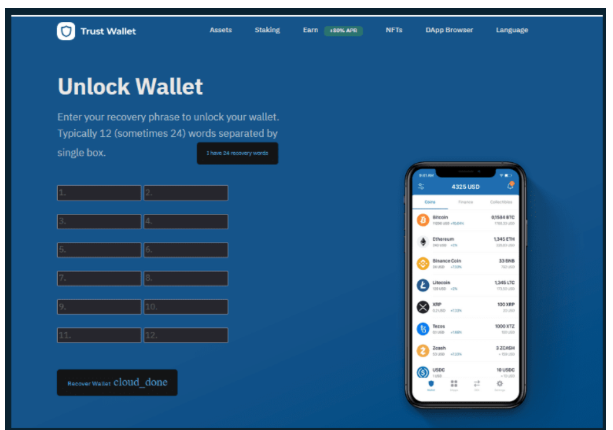
Trust Wallet’s incident update asks users to raise issues only through its official support form.
3. Fake “Urgent Security Notice” Emails
Some scam emails look like a polite warning from Trust Wallet’s security team. They aim to scare you into acting before you think.
This part shows two documented examples and the details that give the email away.
In December 2025, the security site MalwareTips described an email headed “Urgent Security Notice”.
A Scan Your Wallet button led to a lookalike site that ran a fake scan and showed the wallet as “at risk”.
The page then asked for the recovery phrase, or asked the user to connect the wallet and approve permissions.
Those approvals can let a scammer drain tokens later.
Hornetsecurity documented an earlier wave in 2022.
More than 50,000 emails went out through a real Zendesk account, so the sender looked genuine.
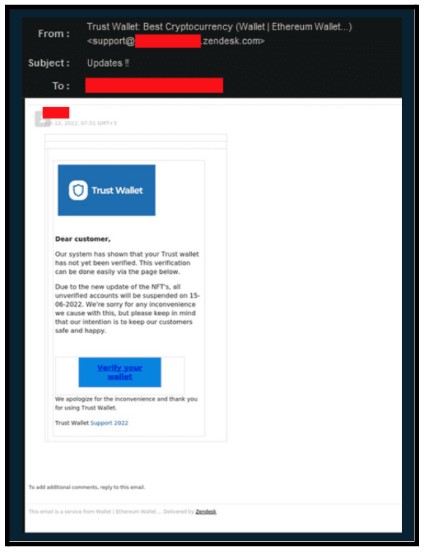
The button led to a fake page with a short countdown, and then it asked for the recovery phrase.
Hornetsecurity pointed out that checking the sender address alone would not have exposed it.
So judge the request, not the sender. A real wallet provider never needs your recovery phrase, whatever the email says.
If an email like this has left you doubting the app itself, our page on is trust wallet app legit tells you whether the genuine app is safe to keep using.
4. Fake Compensation Messages After the Trust Wallet Extension Hack
Whenever a wallet company has a real security incident, scammers rush in with a fake fix.
This part explains what actually happened in December 2025 and how the fake refund messages followed.
If you saw a compensation link and wondered whether it was real, start here.
On 24 December 2025, a malicious version 2.68 of the Trust Wallet browser extension reached the Chrome Web Store.
Trust Wallet says only that extension version was affected, between 24 and 26 December. Mobile app users were not.
Additionally, Trust Wallet linked about $8.5 million to 17 attacker wallets and identified 2,520 affected wallet addresses, and it warned that the figures may change.
It decided to reimburse affected users and asked them to claim through its official support form.
Trust Wallet also said it had received over 5,000 claims, many likely duplicate or fraudulent, and that it reviews each one case by case.
Scammers used that moment. BleepingComputer reported a phishing site, fix-trustwallet[.]com, that asked for the recovery phrase and called it a “security update”.
Trust Wallet also warned about impersonated support accounts, Telegram ads, and fake compensation forms.
The rule is simple. Use only the claim form linked from Trust Wallet’s own announcement, and treat any form that asks for your recovery phrase as a trap.
Also Read: A Hyderabad investor lost ₹72.55 lakh to a fake trading app promoted through WhatsApp by scammers posing as Zerodha in the Zerodha Impersonation Scam.
Other Types of Trust Wallet Scams In India
Not every Trust Wallet scam starts with a fake support agent or a cloned app.
Some tricks rely on tempting wallet balances, misleading transaction approvals, or small details you miss while sending crypto.
Here are three other methods scammers use to gain access to funds or redirect your transactions.
1. How the Loaded Wallet and Fake Multi-Signature Trap Works
This trick does not impersonate Trust Wallet. It borrows the wallet’s name to make a stranger’s offer look believable.
This section walks through the steps in order, so you can recognise the moment where the story turns into a payment request.
It starts with a stranger who shares a recovery phrase, or a link to one.
When you import it, the wallet shows a large balance, and you start imagining the money is yours.
When you try to withdraw, the wallet refuses.
The stranger explains that a multi-signature control blocks the transfer, and that you must send a small amount for fees to unlock it.
You send the fee, and the unlock never comes.
The balance was never real, and the fee went straight to the scammer.
Never import a recovery phrase that someone else gives you.
A wallet you did not create is not yours, and nobody hands over free money for a small fee.
2. Malicious dApps and Wallet Approval Scams
Here the scammer does not need your recovery phrase at all. They need you to approve a transaction, and a convincing website does the persuading.
This section explains what an approval really gives away and why the damage can arrive hours after you click.
- A fake dApp, airdrop page, or “claim” link asks you to connect your wallet and sign a request. If it grants a token approval, the scammer’s contract can move your tokens.
- Some approvals are unlimited. MalwareTips notes that such permissions allow a drain later, even after you close the page.
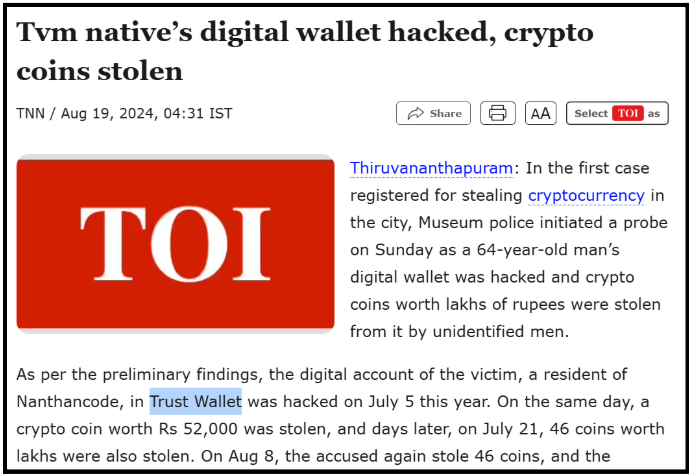
- One reported case from Thiruvananthapuram in July 2024 involved a 64-year-old man who lost crypto worth lakhs within minutes after interacting with a malicious dApp.
- Before you sign anything, read what the wallet screen says you are approving. If you do not understand the request, close it.
3. Clipboard Hijacking, Address Poisoning and Fake Airdrops
These tricks are quieter than the others. Nobody calls you, and nobody asks for a phrase.
This section covers three small traps that rely on a rushed copy and paste or a free token that looks too good to ignore.
With clipboard hijacking, malware on a device swaps the wallet address you copied for the scammer’s address.
You paste it, check only the first few characters, and send.
With address poisoning, the scammer sends a tiny transaction from an address that looks almost like one you use.
Webopedia explains that victims later copy that address from their history by mistake.
With fake airdrops, a token you never asked for appears in your wallet, with a website that invites you to claim more.
Claiming usually means signing an approval.
Check the full address, character by character, before every transfer. Ignore tokens you did not request.
Also Read: Scammers have used fake KYC alerts, OTP traps, and screen-sharing calls to steal money through MobiKwik wallet fraud, including a reported ₹4,000 loss.
How to Spot a Fake Trust Wallet Message, App or Support Agent?
When a message feels urgent, you rarely have time to think. A short checklist helps you slow down.
This section turns everything above into a few checks.
Run through them whenever someone mentions Trust Wallet, and treat one failed check as enough to stop.
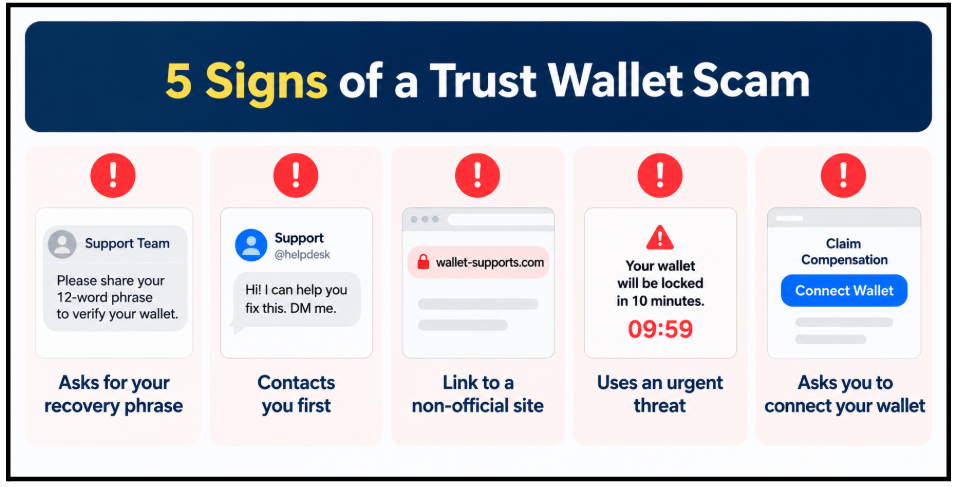
- Anyone asking for your 12-word phrase, private key, or password is an impersonator. Trust Wallet says it never asks for these.
- Anyone who contacts you first about a problem you never reported deserves suspicion.
- A link that is not the official website should stay unopened, even if the logo looks perfect.
- A countdown, a lock warning, or a deadline exists to stop you from checking.
- A request to connect your wallet to claim something may hide a token approval.
We cover the wider habits in our guide on how to avoid crypto scams, which also explains clone apps, fake giveaways and airdrops, and why promised high returns should make you stop.
What to Do If You Shared Your Recovery Phrase or Approved a Transaction?
The first hour matters more than anything else. Once you realise something is wrong, a calm order of steps protects whatever is left.
This section gives you that order. Work through it from the top, and keep every screenshot as you go.
- Stop using the wallet. Do not open the link again and do not reply to the person.
- Create a new wallet on a clean device, with a fresh recovery phrase, and move any remaining funds into it. Trust Wallet gave the same advice to users affected by the extension incident.
- Cancel token approvals you granted to unknown sites, using an approvals checker you trust.
- Save the evidence. Keep transaction hashes, wallet addresses, chats, emails, and screenshots of the fake page or app.
- Report to Trust Wallet through its official support form, never through a chat that found you first.
Blockchain transfers cannot be reversed, which is why speed and evidence matter.
Our page on how do i get my money back from a trust wallet explains what is realistic and what is not.
Also Read: SEBI’s action against two operators of the Wisdom Capital Group included a three-year market ban and a ₹99.86 lakh refund order, revealing the regulatory consequences detailed in the Wisdom Capital impersonation scam.
How to Report a Trust Wallet Scam in India?
Reporting does not undo a transfer, but it creates a record and can help police act on the receiving accounts.
This section tells you where to report and what to carry with you, so the complaint does not stall for missing details.
Call the national cyber crime helpline, as soon as you notice the loss.
Then file a complaint online with the evidence from the steps above.
Our walkthrough on how to file a cyber crime complaint shows each field of the form, so you do not leave out the transaction details that investigators ask for.
Did you type your recovery phrase into a page you now doubt?
You do not have to work out the next step alone. If your loss is above ₹30,000, tell us what happened and we will look at your evidence with you. Register with us.
Conclusion
Trust Wallet scams work because they sound like help.
The fake app, the friendly agent, the security email, and the refund form all ask for one thing, which is your recovery phrase or a signature.
Trust Wallet says it never asks for that phrase, so any request for it settles the question.
Download only from official sources, ignore anyone who contacts you first, and read every approval before you sign.
If something already went wrong, move quickly, save your evidence, and report it.
Report. Recover. Stay Fraud Free.
Frequently Asked Questions
No. Trust Wallet is a real wallet app, and scammers use its name. Losses usually come from fake apps, fake support, phishing emails or approvals you signed, not from the official app. Download it only from official sources.
No. Trust Wallet says it will never ask for your recovery phrase, private key or password through an app, email or message. If an agent, form or website asks, treat it as an impersonator and stop immediately.
Check that the publisher reads Trust Wallet, and download only from the official website or major app stores. Never type your recovery phrase to verify anything. Apps reached through ads, chats or unofficial stores deserve extra suspicion.
Trust Wallet said it decided to reimburse affected users and reviews claims case by case, on a best effort basis, with timing that varies. It accepts claims only through its official support form, so ignore any other link.
Call the national cyber crime helpline, or file on the national cyber crime portal with your transaction hash, wallet addresses and screenshots. Also report to Trust Wallet through official support. Act fast, because crypto transfers cannot be reversed.



 Add us as a preferred source on Google »