
Quick Summary
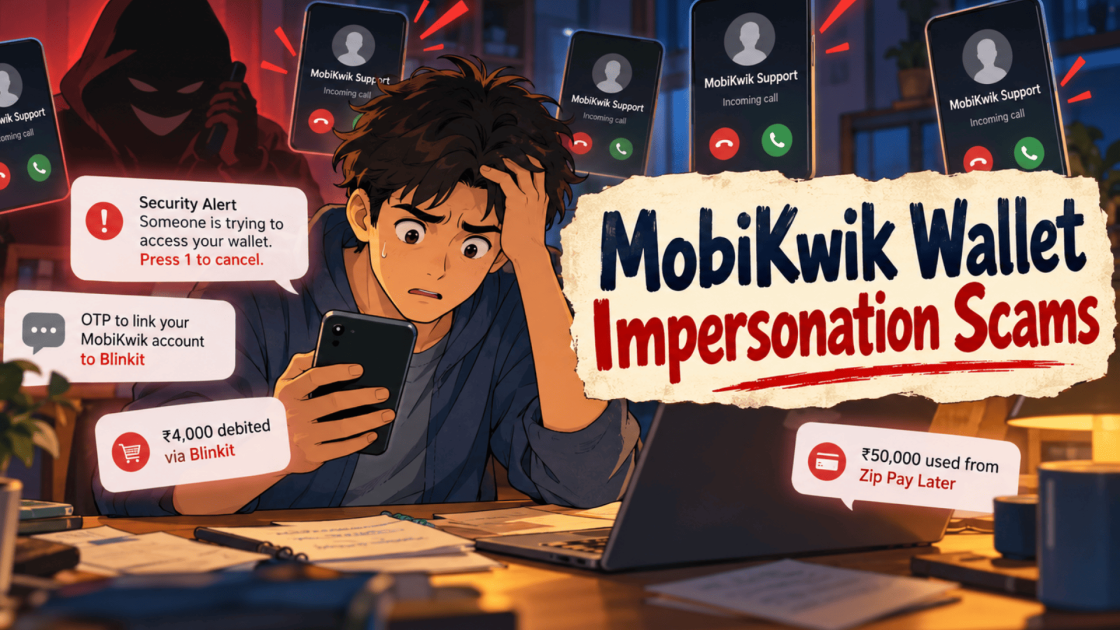
MobiKwik Wallet impersonation scams use fake calls and messages that borrow the wallet’s name, wording and prompts such as KYC, refund and fraud alert. Public reporting names no company or person behind them. Victims describe press 1 calls, an OTP that said link, Blinkit deductions, a screen sharing loss of ₹4,000 and a ₹50,000 loss through Zip Pay Later. This guide covers how the scam works, five victim accounts, police actions and what to do if money leaves your wallet.
Your phone rings; a recorded voice says someone is trying to get into your wallet, and it asks you to press 1 right now. That is how MobiKwik Wallet impersonation scams often begin.
The call sounds urgent, the number can look familiar, and the words feel routine.
Victims have described what happens next in their own posts.
This guide walks through those accounts so you can spot the pattern before you press anything.
What Are MobiKwik Wallet Impersonation Scams?
MobiKwik Wallet impersonation scams are fraud attempts where callers and message senders pose as MobiKwik support.
They are not MobiKwik. They use its name, its wording, and familiar prompts such as KYC, refund, and fraud alert to win your trust.
Public reporting does not name a single company or person behind this.
It shows anonymous callers and senders posing as wallet support.
MobiKwik is the brand being copied here.
Treat every unexpected call about your wallet with caution, whatever the screen shows.
How the Fake MobiKwik Call Scam Works
The research describes the same pattern across several victim reports. Here are the eight steps in the order victims describe them.
Step 1: A Fake Security Alert Opens the Call
The caller says they are from MobiKwik.
They claim someone is trying to access your wallet, link it to Blinkit, or start an unauthorised transaction.
None of that is real. The alert exists only to get your attention.
Step 2: Panic Does the Heavy Lifting
Next comes a warning that your money may be stolen.
The caller or the recording tells you to press 1 to cancel the suspicious activity.
Some victims say the calls kept coming from different numbers.
Repeated calls add pressure, and pressure makes people respond faster than they think.
Step 3: A Key Press Is Framed as Protection
You may be asked to press a key during an IVR call or follow the caller’s instructions.
The action is presented as a security measure.
That framing makes you believe you are protecting your account when you may be doing the opposite.
Step 4: The OTP Message Can Give the Game Away
In one reported incident, the victim received an OTP that said it was meant to link their MobiKwik account to Blinkit.
That contradicted the caller’s claim that they were cancelling an unauthorised transaction.
The victim did not enter the OTP. That may have stopped the linking from finishing.
The lesson is simple. Read the full OTP message before you share or type any code.
Step 5: The Screen Sharing Variation
In another incident, an Instagram ad promised heavily discounted purchases.
The victim then had to share the MobiKwik app screen over Google Meet to verify the wallet balance.
The victim reported that ₹4,000 left the wallet afterwards. The exact way it happened is unconfirmed.
Screen sharing can expose sensitive details or let someone watch an active payment session.
Scam ads are not limited to Instagram, and our page on the Google ad scam crackdown shows how fake ads reach people through search.
Step 6: Money Leaves Through Blinkit Transactions
Several victims reported deductions through transactions linked to Blinkit.
Depending on the case, the cause may involve account linking, misuse of a logged-in session, or another payment authorisation weakness.
The reviews do not show one common technical method for every incident.
Anyone who claims to know the exact method is guessing.
Step 7: A Green Tag Makes the Caller Look Genuine
Some callers reportedly appeared with a MobiKwik-related green tag on Truecaller.
A tag like that can create a false sense of trust.
It does not verify who is calling.
Step 8: The Victim Finds Out
People realise something is wrong when an unexpected OTP arrives, an unauthorised transaction alert appears, or money goes missing from the wallet.
Some victims say they tried to reach customer support repeatedly afterwards.
That is one more reason to act fast and keep records.
Why Fake MobiKwik Calls Look So Real
Most victims say the call felt genuine. This section shows which details scammers can copy, so you know why a familiar look proves nothing.
The table below lists four details that can match the real thing and what each one means for you.
|
What looks real |
What it means |
|
Caller ID |
The incoming number can look exactly like the official helpline. |
|
OTP SMS |
The message really does come from the wallet’s sender ID. |
| Familiar words |
Terms like KYC, fraud alert, wallet blocked and unrecognised device come from real alerts. |
| Believable reasons |
A refund, a cashback, a security check or a KYC expiry all sound routine for a wallet user. |
When every detail can match, trust the channel and not the caller. If a call worries you, end it and open the official app yourself.
Real Experiences of MobiKwik Wallet Impersonation Scams
These are five accounts that victims posted publicly.
We share them as the posters described them, and we have not tested or verified each claim.
Names, numbers, and other personal details stay hidden in every screenshot.
Experience 1: Blinkit Transactions Right After Pressing 1
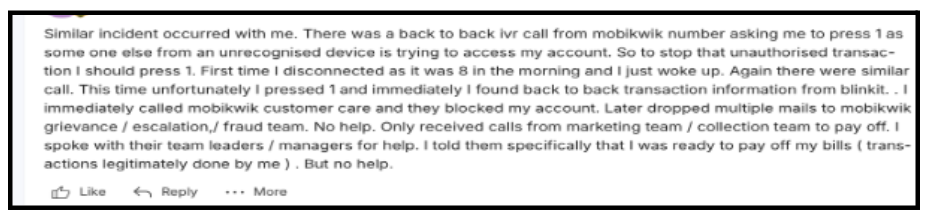
A user described back-to-back IVR calls from a number that looked like MobiKwik’s.
The call said someone on an unrecognised device was accessing the account and asked them to press 1.
They ignored the first call at 8 in the morning.
On the second call, they pressed 1 and immediately saw back-to-back Blinkit transaction messages.
According to the screenshot, the user called MobiKwik customer care at once, and the account got blocked.
They then emailed the grievance and escalation team several times and said they received no help.
They said only the marketing or collection team called about paying off bills.
The comment shows as over two years old.
Experience 2: The OTP That Said Link, Not Delink
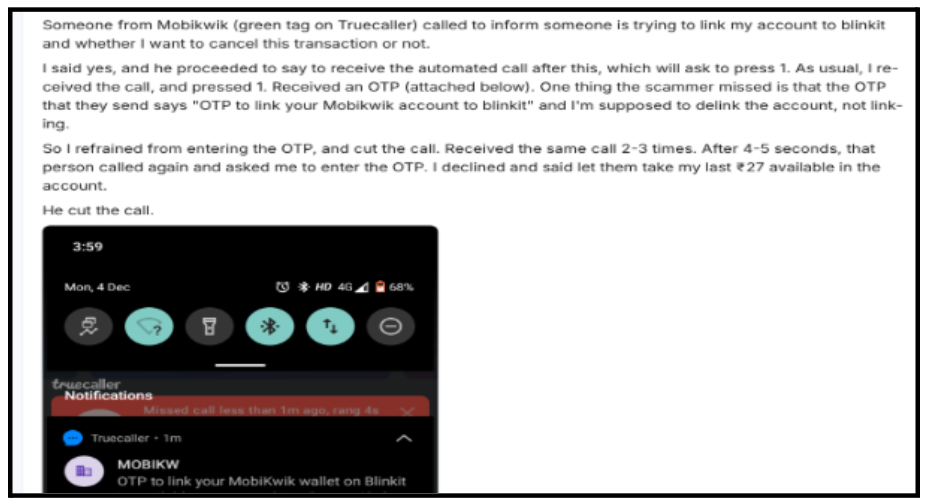
Another user got a call from a number with a green Truecaller tag.
The caller said someone was trying to link the account to Blinkit and asked if they wanted to cancel it.
The caller said an automated call would follow and asked them to press 1. It did, and an OTP arrived right after.
The user noticed that the OTP text said: “to link your MobiKwik wallet to Blinkit”.
They expected a message about delinking, so they did not enter it.
The same call came two or three times. The caller then asked for the OTP, and the user told them to take the last ₹27 in the account.
That comment shows as almost three years old.
Experience 3: Fourteen Calls After One Angry Reply
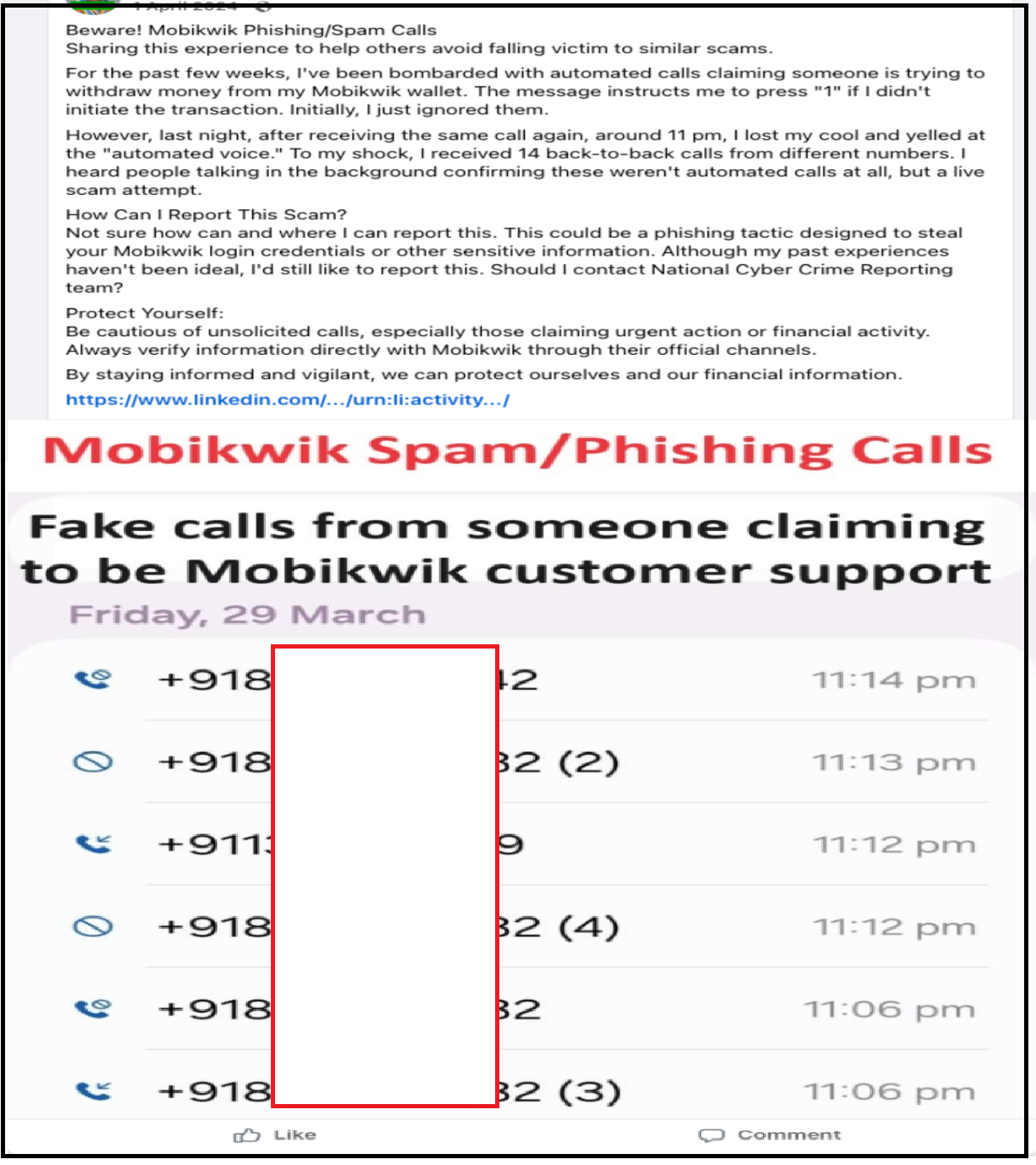
A Facebook post, dated 1 April 2024 in the screenshot, described weeks of automated calls.
Each call said someone was trying to withdraw money from the wallet and asked the user to press 1 if they did not start it.
The user ignored them at first. Around 11 pm one night, they lost patience and shouted at the automated voice.
The next thing they reported was 14 back-to-back calls from different numbers.
They heard people talking in the background, which told them these were live callers and not a recording.
The post asks how to report such calls and mentions the National Cyber Crime Reporting Team.
It also advises people to verify through official channels. The call log screenshot is dated Friday 29 March.
Experience 4: ₹4,000 Gone After a Google Meet Screen Share
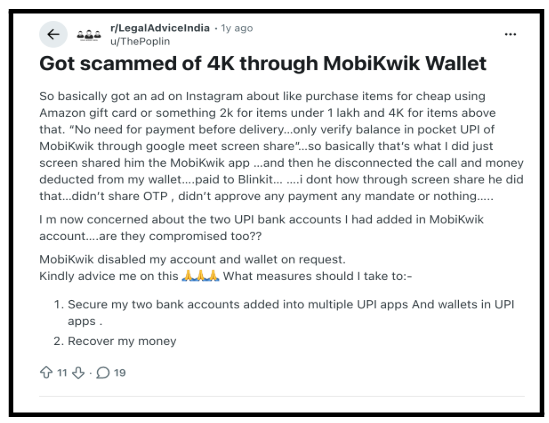
A user posted on Reddit’s r/LegalAdviceIndia. The post is shown as about a year old.
They saw an Instagram ad about buying items cheaply with an Amazon gift card or similar.
The ad offered a ₹2,000 structure for items under 1 lakh and ₹4,000 above that.
The ad said no payment was needed before delivery.
They only had to verify the balance in the MobiKwik pocket UPI through a Google Meet screen share.
After the screen share, the call ended, and money left the wallet, paid to Blinkit.
The user said they did not share an OTP, approve a payment, or approve a mandate.
They also asked about two UPI bank accounts added in MobiKwik. They said MobiKwik disabled the account and wallet on request.
Experience 5: About ₹50,000 Through Zip Pay Later
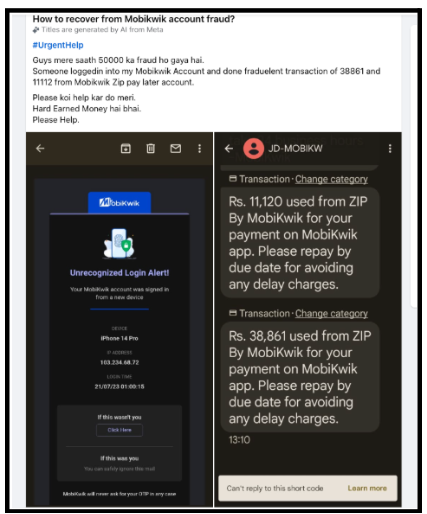
A Facebook post titled “How to recover from Mobikwik account fraud?” described a different kind of loss.
The poster said someone logged into the account and made fraudulent Zip Pay Later transactions of ₹38,861 and ₹11,120, about ₹50,000 in all.
The post shows an unrecognised login alert email for a new device, dated 21/07/23.
The SMS screenshot shows ₹11,120 and ₹38,861, so the smaller amount differs slightly between the typed post and the SMS. Treat the total as roughly ₹50,000.
Commenters suggested a cyber cell complaint, contacting wallet care, and an RBI complaint.
One called the cyber cell complaint a formality. Another said the same thing happened to them.
One comment asked the poster to share their number.
Be careful with replies like that, since people who have just lost money attract fresh scammers.
What Police Have Said About Similar Fake Customer Care Gangs
The research points to two police actions that show how this method works.
Neither case names MobiKwik, so read them as examples of the same playbook and not as proof about any one brand.
Police in Jharkhand arrested nine people accused of posing as customer care for several payment brands and sending malicious APK files.
MobiKwik was not among the brands named.
An independent news service, Ministry of Cyber Affairs, reported that the raids took place on 17 October 2026 in the Sarath area of Deoghar.
It said the accused allegedly posed as customer care or officials for Google Pay, PhonePe, Paytm, Flipkart, Amazon Pay and Airtel Payments Bank.
The report says the APK files looked like PM Kisan, electricity bill, and RTO challan apps and were allegedly used to take control of victims’ phones.
Police seized 12 phones and 12 SIM cards, and the numbers were linked to complaints in several states.
A case is registered at Deoghar Cyber Police Station, and all nine went to judicial custody.
If you wonder how a malicious app takes over a phone, our guide on can scammers hack my phone explains phishing, malicious apps and fake support calls.
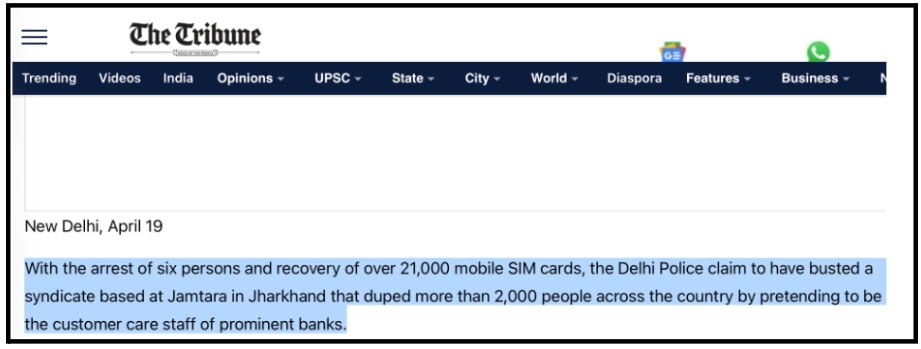
Earlier, in April 2023, the Tribune reported that Delhi Police busted a Jamtara-based syndicate.
Police arrested six people and seized more than 21,000 SIM cards.
Police said the group paid Google, Facebook and Instagram for ads that promoted fake customer care websites, which also ranked high in Google search.
They said more than 2,000 people lost money across the country, including a Dubai-based complainant who lost ₹10 lakh.
How to Spot a Fake MobiKwik Call Before You Press Anything?
The victims above all had one thing in common. They acted during the call.
This section gives you simple habits that take the call out of the driver’s seat.
Start with the most useful habit. End the call and open the MobiKwik app yourself. If the alert is real, you will see it there.
Our page on how to check if a phone number is scam explains why you should hang up and call back on an official number, since lookalike support numbers are common.
Do not press 1, or any key, on an unexpected alert call. Victims in Experience 1 and Experience 3 describe what followed.
Read every OTP message in full.
The user in Experience 2 caught the scam because the SMS said link while the caller said cancel.
Never share your screen to check a wallet balance. You can open the app yourself, so nobody else needs to see it.
Finally, remember that a green Truecaller tag and a familiar caller ID prove nothing. Both can appear on a scam call.
What to Do If Money Left Your MobiKwik Wallet?
If you already pressed 1, shared your screen, or lost money, move step by step. This section lists what to do first and what to keep.
Here are four actions to take in order, starting with the most urgent.
- Contact MobiKwik through its official app or website and ask them to block the wallet. Victims in Experience 1 and Experience 4 said the account got blocked or disabled on request.
- Review linked accounts. Check the UPI and bank accounts added to your wallet, and look at any Zip Pay Later activity.
- Call the national cybercrime helpline, and file a complaint on the national cybercrime reporting portal.
- Save your proof. Keep call logs, SMS and OTP texts, transaction alerts, emails and screenshots.
If the payment went through UPI, our page on how to report UPI frauds shows how to reach your bank or UPI app, the NPCI portal, and the cybercrime complaint system.
Report early and keep every record, because the details are freshest right after the incident.
Do not delete chats, SMS, or call logs, even if they feel embarrassing.
For the first steps after any online fraud, read our page on what to do if online fraud happens.
Lost money after a fake MobiKwik call and not sure what to do next?
Start with our guide to the cyber crime portal, then let our team look at your case with you. We explain your options clearly, and we never promise recovery. Register with us for a free consultation.
Disclaimer: This article shares publicly reported experiences and news reports for awareness. It is not legal advice, and it does not accuse any company or person. Every case is different, and we cannot promise that any lost money will come back.
Conclusion
MobiKwik Wallet impersonation scams work because every detail can look real. The caller ID, the OTP SMS, and the wording can all match.
Victims lost money after pressing 1 on an alert call and after sharing a screen, and one reported a loss of about ₹50,000. Police have arrested people for similar fake customer care methods.
Hang up, open the app yourself, read each OTP, and report fast.
Report. Recover. Stay Fraud Free.
Frequently Asked Questions
The research treats these calls as impersonation. The callers are not MobiKwik, even when the number or tag looks familiar. If you get one, end the call and check your wallet in the official app.
Several victims reported deductions through Blinkit linked transactions after pressing 1 or after a screen share. The reviews do not establish one technical method. The cause may involve account linking, misuse of a logged in session or another payment authorisation weakness.
One victim reported a loss of ₹4,000 after sharing the MobiKwik app screen on Google Meet. The exact way it happened is unconfirmed. Screen sharing can expose sensitive details or let someone watch an active payment session, so avoid it.
No. Such labels can build false trust but do not verify the caller's identity. Victims in the research say callers appeared with a MobiKwik related green tag.
Contact MobiKwik through its official app or website, file a complaint on the national cyber crime reporting portal. Keep your screenshots, SMS texts and call logs ready when you report.

 Add us as a preferred source on Google »

