
Did you lose money because of Angel One MCX glitch? You are not alone. Keep reading, we will tell you exactly what to do.
Imagine this.
You are sitting in front of your phone or computer. You see a good trade. You press the button to buy or sell. Nothing happens. The app freezes. Or your stop-loss doesn’t work. By the time everything comes back, you have already lost money.
If this happened to you on Angel One while trading on MCX, gold, silver, crude oi, then you already know how terrible that feeling is.
And then you called Angel One support. They said: “It’s an MCX problem.”
You called MCX. They said: “Talk to your broker.”
You are stuck in the middle. With a loss. And no answer.
This has happened not once, not twice, but at least 3 times in the last one month. Traders are angry. And they have every right to be.
This blog will tell you:
- What exactly happened?
- Why does this keep happening?
- How can you officially complain and try to get your money back?
Let’s go step by step.
What Is This Angel One MCX Glitch Everyone Is Talking About?
MCX is the exchange where commodities like gold, silver, and crude oil are traded in India.
Angel One is a broker; they are the middleman between you and MCX.
When you place a trade on Angel One for MCX, your order goes from Angel One’s system to MCX’s system. If either system has a problem, your trade doesn’t go through.
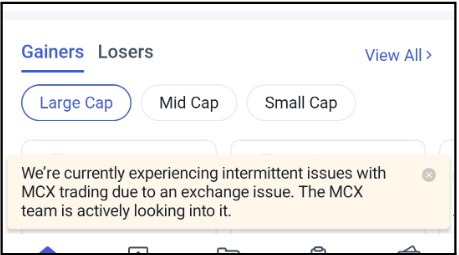
Recently, many users reported Angel One not working as they saw this message on their screen:
“We’re currently experiencing intermittent issues with MCX trading due to an exchange issue. The MCX team is actively looking into it.”
Simple words. But the damage it caused? Not simple at all.
Angel One MCX Technical Glitch Timeline
This is not a one-time thing.
Look at the history of this Technical Glitch:
- February 2024: MCX systems had a problem. Trading was delayed by more than 4 hours. Traders couldn’t do anything. They just had to watch and wait.
- July 23, 2025: MCX went down again. First, they said trading will start at 9:45 AM. Then they said 10:10 AM. Trading finally started after 10:17 AM. More than 1 hour lost.
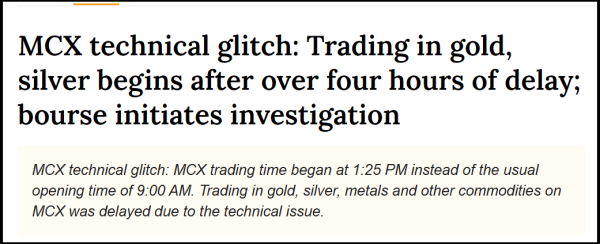
- October 28, 2025: This was the worst one. MCX had to shift to a backup system. Trading didn’t start until 1:25 PM, almost 4 hours late. SEBI (the regulator that looks after the stock market) actually asked MCX to explain what happened.
- March 2026: Traders on both Angel One and Zerodha reported problems placing orders on MCX. Crude oil was moving fast. People were losing money because their orders were stuck.
- April–May 2026 (Right Now): It is happening again. For the 3rd time in a month. For the 2nd time in just 2–3 days. Angel One is saying it’s MCX. MCX is saying it’s Angel One. And you are the one paying the price.
Angel One Paid ₹19 Crore to Traders, But Why?
Here is something very important that was recently reported in the news.
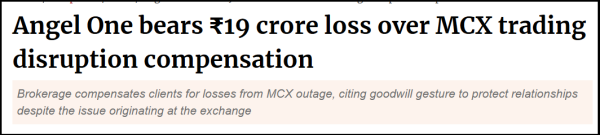
After the big October 2025 outage, Angel One quietly paid ₹19.2 crore to some of its clients who lost money during the MCX glitch. They called it a “goodwill gesture.”
What does that mean in simple words?
It means they knew traders lost money. They knew it wasn’t fully the trader’s fault. So they paid some people back, without anyone forcing them to.
But here’s the problem: Not every trader got compensated. Only those who raised their voice. Only those who had complaints on record.
If you didn’t complain officially, you probably got nothing.
And now the glitches are happening again. Which means, if you lose money this time and don’t file a complaint, history will repeat itself.
File a complaint. Get on record. That is how you protect yourself.
“Is It Angel One’s Fault or MCX’s?”, The Blame Game Nobody Wins
When an exchange like MCX goes down or experiences routing failures, the broker, in this case Angel One, is the client’s only point of contact.
The broker’s systems connect to the exchange, route your orders, and manage your positions.
When that chain breaks, both parties bear responsibility for how it’s handled, communication, compensation, and continuity.
SEBI has already asked MCX for details following the October 2025 outage. The regulator is watching. But regulatory action moves slowly.
However, because both Angel One and MCX know that most traders don’t complain officially.
They send a sorry message on the app. They blame each other. And most traders shake their heads, take the loss, and move on.
So when you file official complaints with SEBI, with MCX, through proper channels, things change. Companies have to respond. Regulators start watching. Money gets paid back.
One big report said it clearly: “Traders continue to get impacted due to technical issues at the exchange, with several instances across the previous few months. This needs to be resolved.”
It won’t be resolved unless traders speak up. You speaking up is what creates pressure.
What Kind of Losses Are We Talking About?
If you faced the Angel One MCX glitch, your loss could have happened in different ways:
- You tried to buy or sell, but the order didn’t go through, and the price moved against you.
- Stop loss not working in Angel One is one of the most reported problems; instead of a small, controlled loss, traders end up taking a massive hit they never planned for.
- Your order showed “pending” for a long time, your money was locked, and you couldn’t trade.
- When the system came back, prices had already crashed or jumped, and you were on the wrong side.
- You got a margin call even though your position was fine, because the system showed wrong numbers.
Any of these can hurt badly, especially if you were trading crude oil or gold in a fast-moving market.
Also Read: Groww technical glitch: A different broker, the same story of a glitch that cost real money.
How to File a Complaint Against Angel One?
Don’t worry, this is not complicated.
To fix the loss due to technical glitch, we will walk you through it one step at a time.
Here are the steps for technical glitch reporting:
- Save Everything First: Save your error screenshots, order history, P&L statement, support chat, and complaint ticket number. The more evidence you have, the stronger your case.
- Complain to Angel One First: Raise a formal complaint through the app or email their Grievance Officer directly. Give them 15 to 30 days; if unresolved, move forward.
- File a Complaint in SCORES: Register at SEBI SCORES with your PAN, select Stock Broker, describe the issue with dates and order numbers, and upload all documents. Angel One is legally required to respond within 30 days.
- File with MCX: Since MCX is directly involved, file a parallel complaint on their grievance portal. Filing from both sides creates pressure and strengthens your position.
- Approach the Consumer Forum if Nothing Works: If SEBI and MCX both fail to resolve your complaint, file before the Consumer Disputes Redressal Commission in your district. A technical failure causing financial loss qualifies as a deficiency of service under consumer law.
Navigating grievance portals, drafting technically sound complaints, and knowing exactly which evidence to submit at each stage is not something most investors should have to figure out alone.
If you have suffered losses due to Angel One’s platform failure and are unsure where to begin, register with us.
Our team will assess your case, prepare your complaint with the right documentation, and guide you through every step, from SCORES filing to Consumer Forum, so your grievance actually gets heard and acted upon.
Conclusion
Angel One and MCX can debate whose systems failed. That debate doesn’t put money back in your account.
What puts money back, or at least creates the pressure to do so, is a formal, documented complaint filed through the right channels through us.
The ₹19 crore that Angel One paid out wasn’t charity. It was the result of regulatory pressure, reputational risk, and, fundamentally, traders who refused to stay quiet.
Don’t stay quiet. File your complaint today.





 Add us as a preferred source on Google »

