

Quick Summary
SD Pay is a real, downloadable app from S.D. HUB (OPC) Private Limited, but it does not appear on RBI’s official list of approved payment aggregators or PPI issuers. Deposited funds sit in a holding balance for close to 8 days before becoming available, and the app’s own Play Store and App Store listings contradict each other on how much personal data gets collected. Real user reviews describe login lockouts right after KYC, unresolved withdrawal problems, and support that doesn’t respond. This page checks every one of those claims against the facts, so you can decide if SD Pay is safe or not before depositing anything.
Have you seen an ad or a forwarded reel promising daily cashback just for depositing money into an app called SD Pay?
Maybe a friend shared a screenshot of their “earnings,” and now you’re wondering if it’s actually worth your time.
Before you download anything or hand over your bank details, the real question you need answered is simple.
Is SD Pay safe or not?
This blog walks through the company behind it, its RBI status, its wallet structure, and what real users are saying, so you can decide with facts instead of hype.
SDPay Review
Let’s start with what SD Pay actually claims to be.
SD Pay calls itself a hyperlocal discovery and payments app.
It connects users with nearby merchants for shopping, dining, and everyday bill payments like mobile recharges and electricity bills.
The app also promotes an SD Pay card, described as working like a payment card at partner vendors for extra discounts.
On the surface, this looks like a fairly standard local commerce app. There’s a wallet, a scan to pay feature at merchants, and a referral system built on top.
Here’s where it gets interesting. Most of the visibility around SDPay doesn’t come from its bill payment or discovery features.
It comes from Instagram reels and YouTube videos focused almost entirely on daily earnings and referral codes.

That’s worth keeping in mind before we go further, because it shapes almost every other question in this review.
SD Pay Profile
SDPay is listed under the developer name S.D. HUB (OPC) Private Limited, with the company address given as Mehsana, Gujarat.
It’s available on both the Google Play Store and Apple’s App Store, so it does run on Android and iOS.
The App Store listing shows a rating of around 4.4, based on the reviews visible at the time we checked.
Download numbers vary a lot depending on the source.
Some listings point to figures in the hundred thousands, others cite numbers in the millions. Because this keeps shifting, check the live Play Store listing yourself for the current count rather than relying on any single number here.
The core functions listed are: local merchant discovery, discounts, mobile recharge and utility bill payments, the SD Pay card, and a wallet with a referral based earning structure.
SDPay Company Details
For anyone trying to verify legitimacy on their own, company details matter more than app store descriptions.
SD Pay’s registered developer is S.D. HUB (OPC) Private Limited, based in Mehsana, Gujarat.
Past this basic registration information, independent verification gets difficult. Reviewers have pointed out that the company doesn’t have an easy to find office listing on Google Maps, and its web presence outside app store listings and its own promotional content is thin.
For comparison, established fintech companies in India usually have a visible corporate website, a listed office address, and clear regulatory disclosures. All of that makes it simple to check who’s actually running the platform. SD Pay’s public footprint doesn’t match that.
SD Pay Is Real or Fake
Here’s the part that trips a lot of people up.
SD Pay is real, in the sense that it’s a genuine, downloadable app with an active listing, a working sign up flow, and features like merchant discovery and bill payments that actually function. It is not a fake, empty shell app.
But real and trustworthy are two different things.
A few practices built into how SD Pay operates raise real concerns, even though the app itself works fine:
- High daily cashback, 0.15% to 0.30% on deposited funds, plus a 50% monthly bonus, is hard to sustain without new deposits from newer users.
- The referral program is pushed hard across promotional content, with codes shared openly in comment sections. This kind of growth pattern looks closer to multi level marketing than a typical cashback bonus.
- Customer support is widely reported as unresponsive, with users describing disconnected numbers and unanswered emails.
- No RBI registration shows up on official regulator lists, despite the app dealing directly with deposits and cashback on those deposits.
So when someone asks if SD Pay is real or fake, the honest answer is: it’s real as a product, but several of its practices don’t match how a trustworthy financial app should behave.
SD Pay RBI Approved or Not
This might be the most important question if you’re thinking about depositing any money.
In India, any platform handling deposits, wallets, or payment settlement is expected to operate under RBI’s regulatory framework.
That means being an authorized Prepaid Payment Instrument (PPI) issuer or a registered payment aggregator, under the Payment and Settlement Systems Act.
So, is SD Pay RBI approved?
Checking RBI’s published lists of authorized PPI issuers and payment aggregators, the same lists that include names like Amazon Pay, Razorpay, and Pine Labs,
SD Pay doesn’t appear anywhere. Not even in the most recent updates.
This absence matters. A platform that genuinely holds RBI approval usually displays its certificate number and links straight to the relevant RBI page.
That’s a basic trust signal for any fintech company. SD Pay doesn’t show this kind of documentation on its site or app listing.
Without RBI oversight, there’s no regulator actively supervising how deposited funds are held, used, or protected if something goes wrong.
That’s a real gap for any app asking you to deposit money.
Is SD Pay Safe?
Safety also comes down to how an app treats your personal data. This is where SD Pay’s story gets contradictory.
On the Google Play Store, SD Pay’s own data safety disclosure admits to collecting a wide range of information. Names, addresses, phone numbers, bank details, location, photos, and videos.
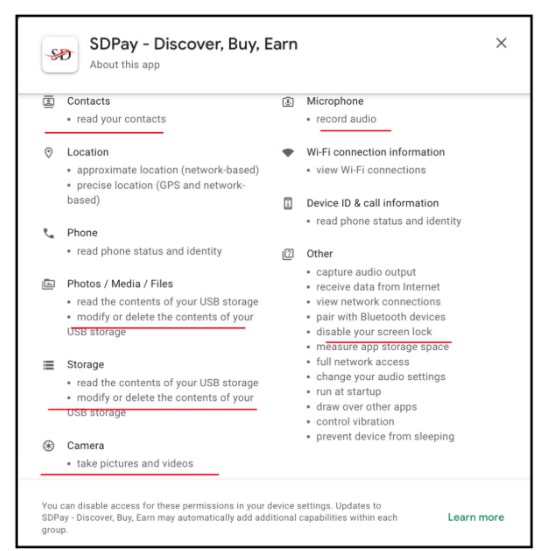
It also asks for permissions to modify or delete device storage and record audio.
That’s a lot of access for an app whose main job is bill payments and local discounts.
Now compare that to the Apple App Store listing, where SDPay states that no data is collected at all. Both disclosures describe the same app.
They can’t both be true.
India’s Digital Personal Data Protection Act, 2023 requires data minimization. Apps should only collect what’s genuinely necessary for their stated purpose, with clear consent.
A hyperlocal payments app asking for microphone access, contact lists, and storage modification permissions goes well past what bill payments or merchant discovery would need.
So when someone searches is SD Pay safe, the answer depends on what they mean by safe.
The app runs without crashing and processes basic transactions fine. But on data handling transparency and regulatory oversight, there are real gaps worth weighing before you sign up.
Also Read: Is Sam Pro app safe? The short answer is no. Here’s the real evidence behind it.
SD Pay Complaints
Everything covered so far comes from checking SD Pay’s own claims against public records. But numbers and disclosures only tell part of the story.
The section below looks at what actual users experienced after signing up and depositing money, in their own words.
These aren’t one-off complaints either; the same handful of problems keep showing up across different reviewers, on different dates.
Here’s what that actually looked like for the people who lived it:
1. SD Pay Login Issues
Login is one of the most repeated complaints across reviews, and it doesn’t come from just one cause. Four different reviewers ran into it in four different ways.
Himanshu Sinha: Locked Out Right After KYC
Himanshu Sinha described completing KYC verification only to get automatically logged out shortly after.
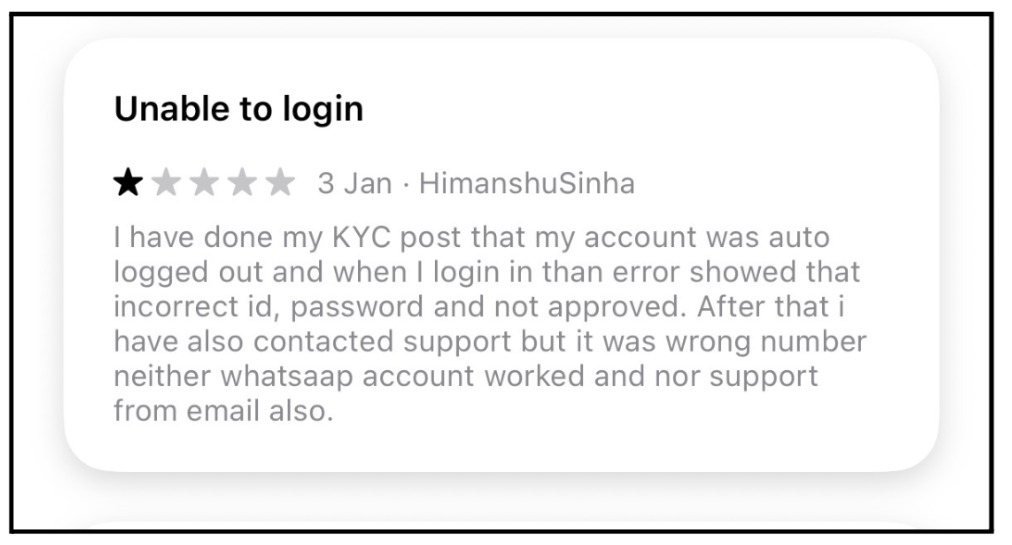
On trying to log back in, the app returned errors claiming incorrect ID, incorrect password, and an unapproved account, all at once.
When the user tried reaching support, the listed phone number turned out to be wrong, and neither WhatsApp nor email support responded.
Vijay Sharma 7184: Couldn’t Log In After Creating An Account
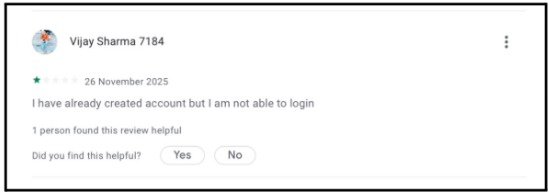
Vijay Sharma 7184 reported creating an account successfully, but then being unable to log in at all afterward, with no further detail on what error the app showed.
Hiral Savani: Blocked From Logging In on Another Device
Hiral Savani described a slightly different version of the same problem, being unable to log into their account from a different device, even while using the same credentials that worked elsewhere.
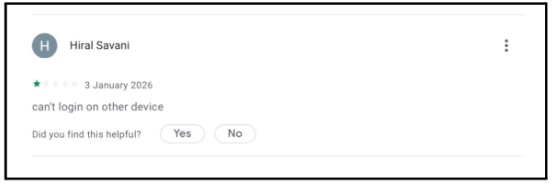
Across all reviews, the login problem shows up after KYC, right after signup, on a new device, and after a phone reset, meaning it isn’t tied to one specific trigger. It’s a recurring weak point in the app itself.
2. SD Pay Scam Allegations From Users
Another reviewer, Devil Devil, called the app a “new type of MLM scam” where earnings scale with how many people you recruit.
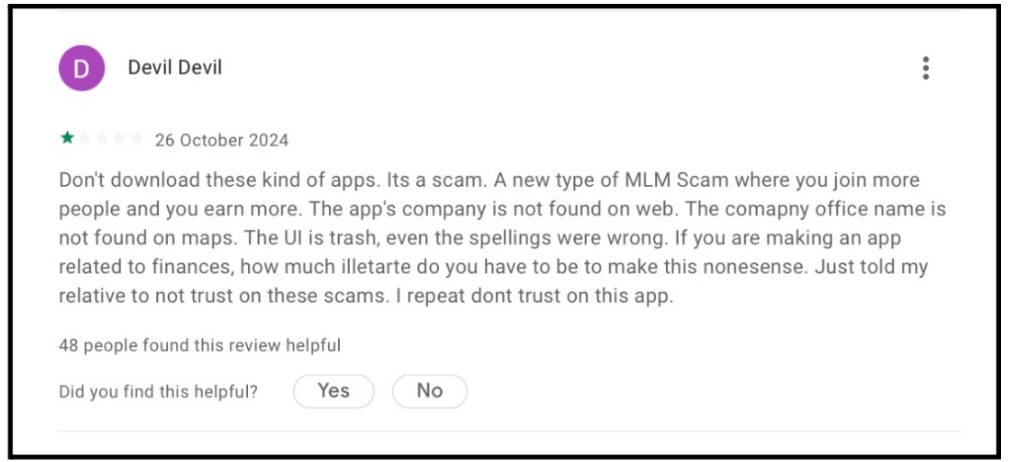
This reviewer specifically pointed out that the company isn’t findable through a general web search, doesn’t have a locatable office on Google Maps, and flagged spelling errors within the app’s own interface.
Details like these make users question the professionalism behind a finance-focused product. 48 people marked this review helpful.
3. KYC and Account Recovery Complaints
A user going by Ibc Devesh described creating an account, depositing ₹1,000 into the wallet, and finding that KYC verification still hadn’t completed the next day.
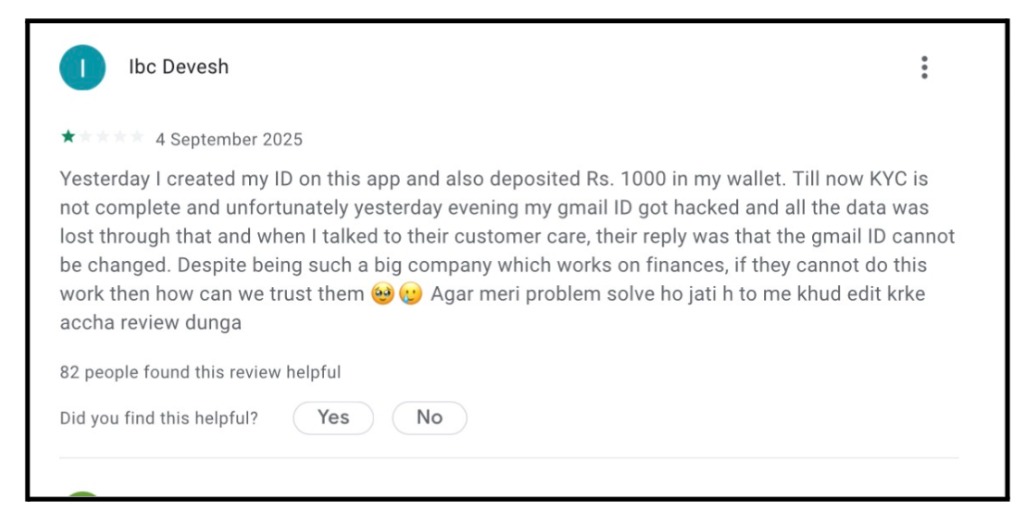
To make things worse, their Gmail account was compromised around the same time. When they contacted SDPay’s customer care for help, they were told the registered Gmail ID couldn’t be changed.
For a platform handling real money, being told account recovery isn’t possible after a security incident is a serious red flag. 82 people marked this review helpful.
4. SD Pay Registration Without Referral Code
A user with the handle GPiyush001 flagged this directly as a bug. Signup simply wasn’t possible without entering a referral code.
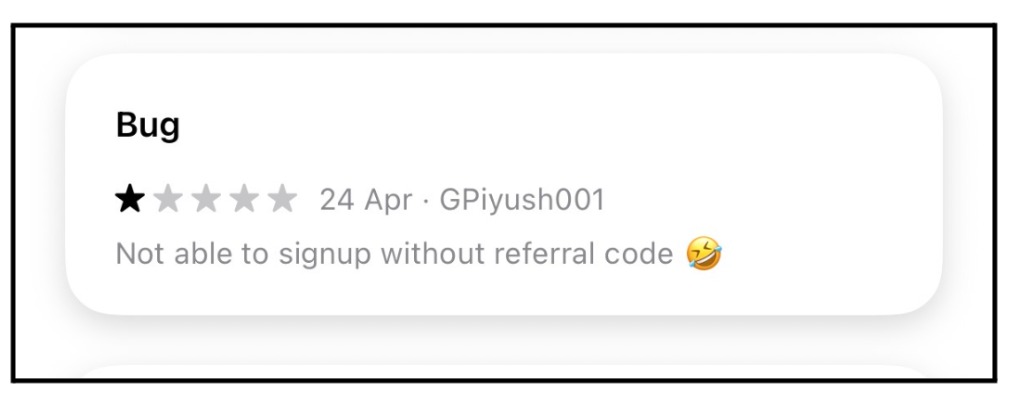
This lines up exactly with the registration issue covered earlier, confirming it isn’t a one-off glitch but something built into how new users are onboarded.
5. SD Pay Withdrawal Problem
Two related complaints sit here.
Gohil Priyrajsinh described registering an account, depositing ₹1,000 as a trial, then resetting their phone. After reinstalling the app, they couldn’t log back in at all, with no support response to help.
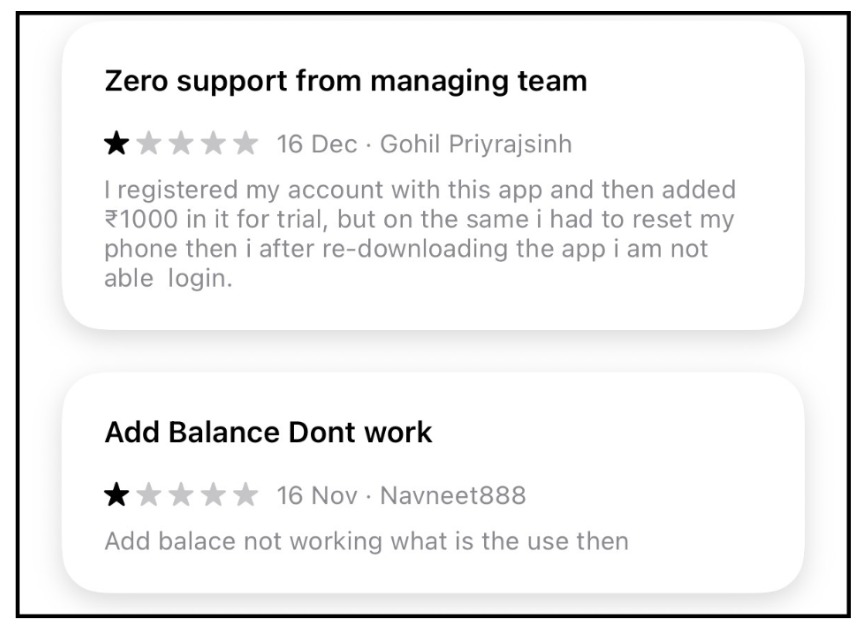
In a second review from the same thread, a user going by Navneet888 reported that the “Add Balance” feature simply didn’t work, questioning what use the wallet even served if funds couldn’t be added reliably.
Both reviews echo something found across both original drafts covering this app: users can deposit money into their wallet, but then struggle, or outright fail, to complete withdrawals or transactions afterward.
In a legitimate financial app, once money is yours, moving it should be simple. When deposits go in easily, but withdrawals or balance updates keep failing, that’s the kind of one-way friction worth treating as a serious warning sign.
Feeling like your money is stuck somewhere it shouldn’t be?
That’s not something you have to sort out on your own.
Register with us, and we’ll help you file your complaint, step by step.
SDPay Owner
Ownership sits with S.D. HUB (OPC) Private Limited, registered as a One Person Company under Indian company law, based in Mehsana, Gujarat.
Past this registered entity name, there isn’t verifiable, independently confirmed public information about individual promoters that we can responsibly report here.
If you come across claims about specific people tied to SDPay circulating online, treat those the same way you’d treat any unverified claim.
If you want to check company level filings yourself, the Ministry of Corporate Affairs website has official registration records.
SD Pay Wallet
How the wallet actually works matters more than the marketing copy around it.
When you add money through UPI or a card, funds don’t land directly in a spendable balance. They move into a holding balance first.
Based on what users have reported, there’s roughly an 8-day wait before deposited funds shift into an “Available Balance” you can actually use or withdraw.
On top of that holding period, the app advertises daily returns of 0.15% to 0.30% depending on wallet balance, plus a 50% monthly bonus on top of that.
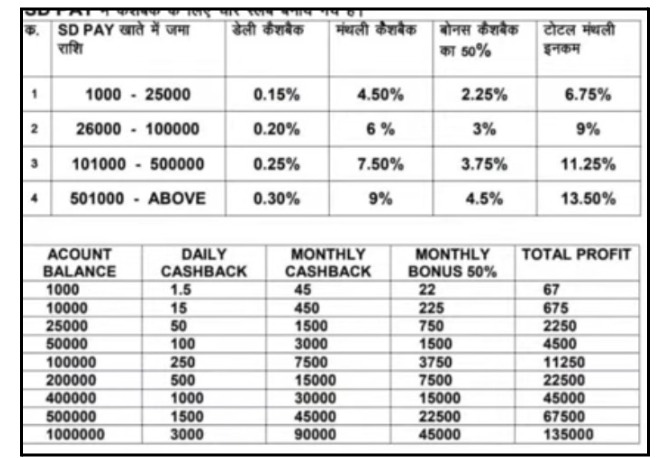
For context, regulated fixed income products in India, things like fixed deposits or debt mutual funds, typically offer annual returns far below what SDPay promises daily.
When advertised returns outpace regulated financial products by this much, that gap is worth thinking through before deciding if it adds up long-term.
SD Pay Plan
The SDPay plan structure centers on deposit tiers and referral levels rather than one fixed offering.
Larger deposits are positioned to unlock proportionally larger daily cashback, scaling up through the percentage brackets mentioned earlier. On top of individual deposits, the plan includes a referral structure spanning multiple levels.
Your earnings can depend on how many people you bring onto the platform under you, and how much they deposit.
This layered structure is exactly why the referral emphasis matters so much here.
A plan that rewards recruitment as heavily as it rewards actual product use starts to look like a network marketing income structure, where early participants benefit mainly from the deposits of people who join later.
SD Pay Login
Logging into SDPay follows a fairly standard flow. Enter your registered mobile number or ID, complete an OTP or password step, and access your wallet dashboard.
In practice, login is one of the most frequently reported pain points among users.
Complaints range from accounts getting logged out unexpectedly right after KYC, to being told credentials are incorrect or not approved despite completing verification correctly.
SD Pay Login Password
Password issues form their own cluster of complaints.
Users have reported being unable to reset their password through the app’s standard flow, with reset requests failing silently or routing to unresponsive support.
If your registered email gets compromised, some users say they were told the linked email cannot be changed.
That effectively locks them out of the account, even after proving ownership through other means.
SD Pay App Login
On the mobile app specifically, login problems seem to spike after a phone reset or app reinstall.
Several users describe logging in fine right up until they switch devices or clear app data, after which the same credentials that worked before get rejected.
That kind of instability matters a lot for a wallet-based app, since losing login access can mean losing access to deposited funds along with it.
SD Pay Registration
Signing up asks for the standard details. Mobile number verification and basic KYC information.
But one registration issue comes up again and again in user feedback. The app reportedly does not allow signup without entering a referral code.
That detail alone tells you a lot about how the platform is built. Payment and bill management apps generally don’t gate core registration behind a referral requirement.
That pattern shows up more often on referral-driven or MLM-style platforms, where bringing in new users is treated as essential rather than optional.
SD Pay Scam or Legit? Red Flags to Know
Here’s the full list of red flags in one place, so you don’t have to piece it together from scattered sections.
- No RBI registration on official authorized PPI issuer or payment aggregator lists.
- Unresponsive customer support, with users reporting disconnected numbers and unanswered messages across email and WhatsApp.
- Contradictory data disclosures between the Play Store, which lists extensive data collection, and the App Store, which claims no data is collected, for the same app.
- A referral-heavy earning structure spanning multiple levels, closer to MLM growth than a standard cashback program.
- Cashback rates that don’t hold up mathematically long term without a steady stream of new deposits.
- An 8-day holding period before deposited funds become available, delaying access to your own money.
- Invasive app permissions, audio recording, storage modification, contact access, well past what a bill payment app needs.
- Registration gated behind a mandatory referral code, uncommon in standard fintech onboarding.
- Recurring user complaints about login failures, KYC delays, account recovery refusals, and withdrawal problems.
- A thin public footprint, no easily locatable office, limited web presence outside its own promotional content.
None of these points alone proves fraud.
Together, they’re hard to ignore if you’re deciding whether to deposit real money.
What to Do If You’ve Lost Money to SD Pay?
If you’ve already deposited money and are running into the issues described above, don’t just stay quiet and hope it sorts itself out. There are concrete steps that actually help.
Here’s what to do, step by step:
- Gather your evidence first. Screenshots of your transactions, deposit confirmations, any withdrawal attempts, and your chat history with support. This documentation matters if you need to escalate the issue formally later.
- Contact your bank or UPI provider directly to flag the transaction and ask about dispute or reversal options. Do this as early as possible, since banks work faster on fresher transactions.
- Follow the complete reporting process in order. Documenting a case like this isn’t just about filing one complaint, it involves a specific sequence of steps that actually improves your chances of resolution. Our guide on what to do if online fraud happens walks through that full sequence.
- File through India’s official cybercrime portal. If you’re unsure what information you’ll need ready, or how long resolution typically takes, our walkthrough on how to file a cyber crime complaint covers the process in detail.
- If SDPay specifically is the problem, unresponsive support, funds stuck in a holding balance, or a login you can’t recover, and you want to formally report it rather than just document it privately, you can report financial fraud India through our homepage, where our team helps direct your complaint the right way.
Conclusion
So, is SD Pay safe or not?
Based on everything above, the honest answer leans cautious.
The app is real, it’s functional, and it does process basic transactions.
But it isn’t RBI regulated, its data collection disclosures contradict each other across app stores, its earning structure depends heavily on referrals, and a steady stream of user complaints points to real problems with logins, withdrawals, and support.
That doesn’t decide for you, but it does mean going in with your eyes open.
Before depositing any money into SDPay, weigh the RBI gap, the permission requests, and the complaint pattern against whatever cashback number first caught your attention.
And if you’ve already run into trouble, don’t sit on it. Document everything and start the reporting process sooner rather than later.
Frequently Asked Questions
SD Pay functions as a real, downloadable app, but it lacks RBI registration, shows contradictory data collection disclosures between app stores, and has a pattern of user complaints about logins and withdrawals. All of that points to caution before depositing money.
No. SD Pay does not appear on RBI's official lists of authorized Prepaid Payment Instrument issuers or payment aggregators, which include established names like Amazon Pay and Razorpay.
SD Pay is a real, functioning app available on the Play Store and App Store. But several of its practices, heavy referral dependence, unsustainable cashback rates, and unresponsive support, resemble patterns seen in less trustworthy platforms.
Multiple users have reported getting logged out or blocked right after finishing KYC verification, with the app returning errors about incorrect credentials or an unapproved account. This looks like a recurring, unresolved issue based on user reports.
Gather your transaction evidence, contact your bank or UPI provider to flag the transaction, and file a report through India's cybercrime complaint channels. You can also reach out through our contact page for help navigating the process.





 Add us as a preferred source on Google »

