

Quick Summary
Sam Pro App is a trading app that WhatsApp group admins asked investors to download. In the chats, they used SAMCO Securities’ name, logo, and even its founder’s name. In one case we reviewed, an investor transferred about ₹30 lakh in August 2026 to current accounts of unrelated firms, and the account changed with almost every deposit. The app then showed ₹2.47 crore in funds. When he asked to withdraw ₹1,15,000, the “adviser” had him cancel the request. SAMCO’s official app carries a different name.
If you searched for Sam Pro App today, chances are the app still shows a healthy balance while your bank account tells a very different story.
We recently went through one victim’s entire phone record. It starts with a friendly Facebook message and ends with a ₹26.4 lakh RTGS slip from a bank branch.
Below, we lay out every step the scammers used, in the same order he lived it, so you can hold your own chats up against it.
If you need to report financial fraud India after reading this, you will know exactly which proofs to collect first.
What Is the Sam Pro App?
Before breaking down the fraud process, let’s examine how the fake app looks and how scammers pitch it to victims.
On the surface, the app copies the layout of a normal broker app.
It has tabs for Home, Market Quotes, Watchlist, Trade, and My Account, plus buttons for Deposit, Withdraw, Fund Details, and Banking Details.
It also has a chat window labelled “Samco Securities, Welcome to Samco Customer Service Center.” That chat does one job above all others. It hands out bank account numbers for deposits.
The group sells the app as a gateway to a special “Primary Market Trading Account.”
According to the admin, this account offers priority execution, IPO quotas, “institutional shares,” and OTC trades that a regular demat account supposedly cannot access.
No SEBI-registered broker sells IPO quotas or institutional shares through a private WhatsApp group.
Every investor applies for an IPO through their own broker or bank, and the exchange runs the allotment. Our full breakdown of how IPO scams work covers this exact “institutional quota” pitch in detail.
Sam Pro App Download From Play Store
In the chats we reviewed, a WhatsApp admin using the name “Saanvi Wadhwa” first asked the investor whether he used an iPhone or an Android phone.
She then told him to open the Google Play Store, search for “Sam pro,” and install it.
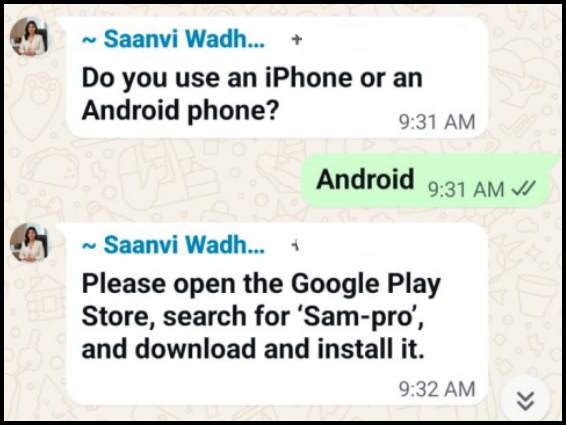
That one step is where most people should stop. SAMCO’s official app is published by Samco Securities Limited, so check the developer name on the store page before installing anything a group points you to.
Once installed, the app asked him to register with shared codes and upload his Aadhaar or PAN, the details of which we’ve broken down in our guide to the sam pro app login.
Also Read: Upstox IPO allotment scam, where a fake site showed 10,00,000 shares subscribed at ₹151.
Is Sam Pro App the Official SAMCO App?
Almost every victim in this pattern believes they are dealing with SAMCO, because every screen and every document carries the SAMCO name.
This section compares what the scammers showed with what the real company lists publicly.
Samco Securities Limited is a SEBI registered stockbroker with registration number INZ000002535.
Its official Android app appears on the Play Store as “Samco: Stocks & Recommendation,” and the developer name shows as Samco Securities Limited.
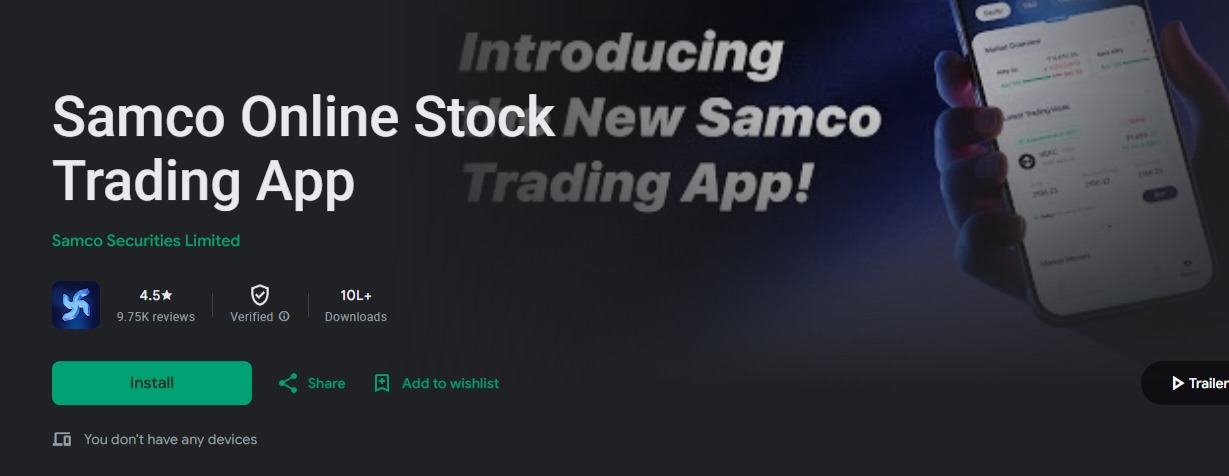
The name “Sam Pro” does not match that official listing.
The chats we reviewed contain nothing that links SAMCO Securities to the WhatsApp groups, the Facebook profile, or the bank accounts.
The pattern matches impersonation, where fraudsters borrow a trusted brand to make strangers feel safe, demonstrating the severe danger of cyber crime in India for retail investors who trust brand names blindly.
The groups also advertised evening lectures by “Professor Jimeet Modi.” Jimeet Modi is the founder of SAMCO.
In the group’s member list, two separate phone numbers carried that same name, which is worth noting for anyone who trusted those sessions.
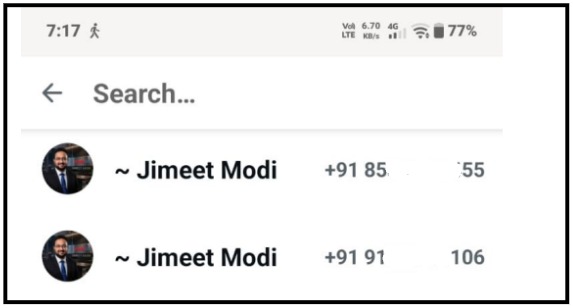
If anyone asks you to install Sam Pro to trade “through SAMCO,” check the developer name on the Play Store first.
Then call SAMCO on the support number printed in its official app listing, 022 2222 7777, or write to [email protected], and ask directly.
Also Read: Quickly Investment App, how a WhatsApp group offered a loan to cover a fake IPO shortfall.
How the Sam Pro App Scam Works From Facebook to WhatsApp?
This scam did not begin with the app. It took nearly two weeks of patient trust-building across Facebook, WhatsApp, and finally the app itself.
If you want to see how easily scammers walk victims through downloading fake trading applications and entering pre-assigned invitation codes, watch this short walkthrough:
Seeing the actual interface—complete with fake verification codes and impersonated branding, makes it much easier to spot the warning signs before any money leaves your bank account.
The steps below follow the actual order of messages on the victim’s phone:
1. A Facebook Profile Called Bollinger Tips
The first contact came from a Facebook profile named “Bollinger Tips.” The bio described a technical analyst with more than 20 years in the share market.
This highlights why cyber crime is increasing in india, as fraudulent profiles on social media platforms easily bypass initial user scrutiny to lure investors into unregulated groups.
The profile had 65 friends and zero posts.
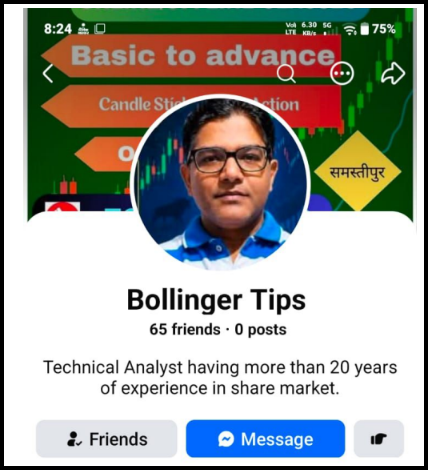
In private messages, the profile asked which stocks he currently held and said it would “help create the best portfolio.” Once he shared a stock name, it offered to invite him to a group.
The same chat promised a free portfolio review with an expected return of 30 to 50 percent.
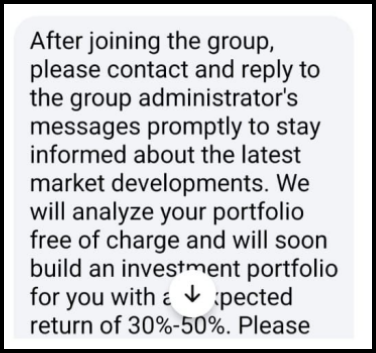
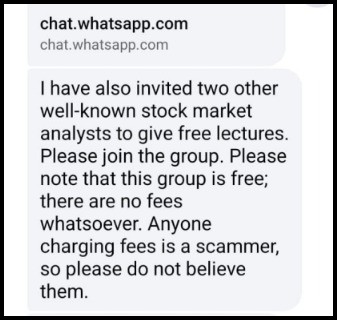
It sent a WhatsApp group link and asked him to add an “analyst assistant,” Saanvi Wadhwa.
One line in those messages stands out. The profile told him the group was completely free and that anyone charging fees was a scammer.
That kind of reassurance lowers a person’s guard just before the real ask arrives.
2. VIP WhatsApp Groups and the Evening Professor Sessions
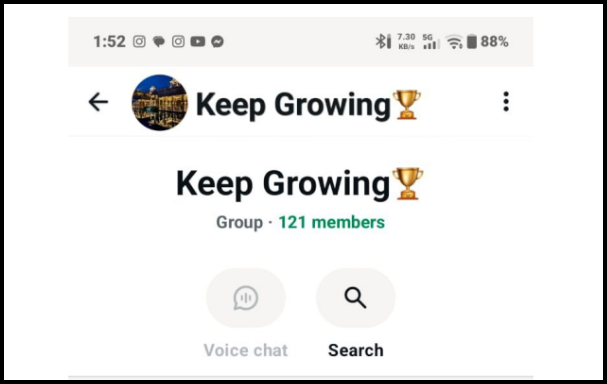
The victim ended up in two groups, “VIP 926” and “Keep Growing.” The second group showed 121 members, with Saanvi Wadhwa and “Prisha Anand” among the admins.
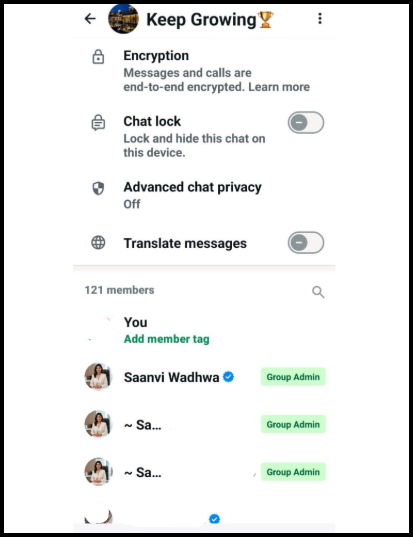
Most of the time, only admins could post.
When the group opened up, members poured praise on the “Professor” in Hindi and English.
The messages called him their guiding light, and his thoughts “great hain aur hamesha great rahenge.”

Each morning, the admin posted “Foundational Stock” picks such as Ind Swift Laboratories and Swati Projects.
The next day, she posted notices telling members to “close position and record profit” and to submit screenshots on time.
The routine looked disciplined, and the profits looked real, because the stock names were real.
Real stock names are the easiest thing in the world to borrow. The group never showed anyone a real contract note or a demat holding.
3. The Applicant Form and the 200 Percent Guarantee
After a few days, the admin pinned an “Applicant form” at the top of the group.
It carried the investor’s personal and financial details, and we have left all of them out here.
The form listed his expected return as 200 percent, his starting investment as ₹5 lakh, and his “execution capability and business confidentiality” as 100 percent.
Right under it, the admin wrote that the club could guarantee a profit of at least 200 percent.
If profits stayed below that mark, the club would charge nothing. If they went above it, the club would keep 20 percent as a “membership fee.”
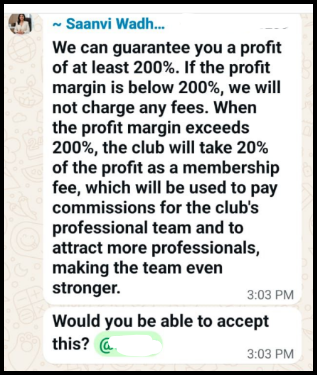
She then listed the rules of the Primary Account.
The client had to follow every instruction, buy or close positions only as told, avoid harming the “collective interests,” and keep all information confidential.
Any promise of guaranteed returns in the stock market is a warning sign on its own.
Rules that demand total obedience and secrecy only make it louder.
4. Registering on Sam Pro With the Admin’s Help
Once the app was installed, the admin walked him through registration and KYC inside the WhatsApp chat itself. He never dealt with SAMCO or any broker directly.
The codes she shared were the same for everyone, which means nothing about the signup was really verified.
A real broker never needs a WhatsApp admin to open your account.
5. Fake SAMCO and SEBI Approval Papers
The group then produced two official-looking documents to seal the trust.
The first was a “SAMCO Primary Market Trading Account” application form with the SAMCO logo, stamped “PASSED” in red.
The admin sent it with a message saying his application had just been approved, followed by “Congratulations.”
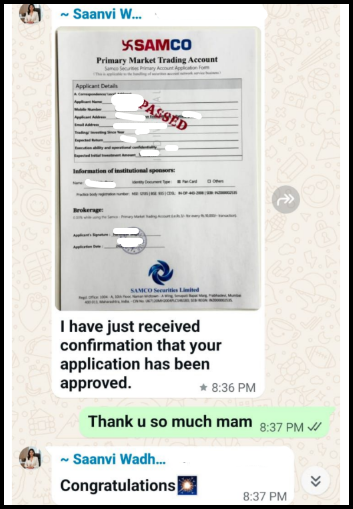
The second arrived later inside the app’s chat.
It carried the SEBI logo and the title “Primary Market Trading Account (Bank Account) Approval Notice.”
It named a private firm’s current account as the place to send money.
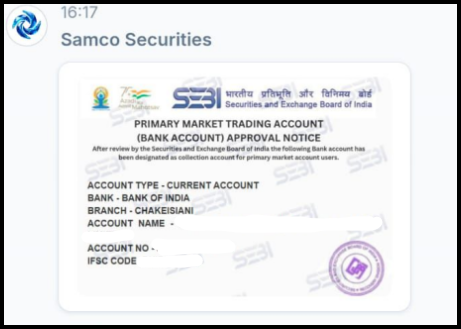
SEBI does not issue approval notices for a private firm’s bank account to collect your trading money.
A registered broker collects client funds only in its own designated bank account, in the broker’s name, from your own bank account.
A genuine application into a real company’s shares, by contrast, follows the documented IPO process in India, routed entirely through your own broker or bank, never a private firm’s current account.
Also Read: Before you install the Finsol app, see why an APK file sent on WhatsApp skips the one check that could protect you.
How Sam Pro App Directs Deposits to Changing Private Bank Accounts?
This is the stage where the money actually left his account.
Once you read the deposit screenshots side by side, the same script repeats every time.
He first told the app’s customer service how much he wanted to add. The chat then asked whether he banked online or went to a branch.
Then came the key line: “Please wait a moment while we match you with a bank account. Please do not leave the chat window.”
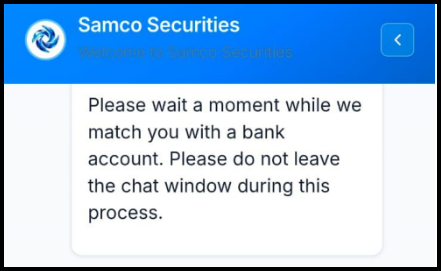
After a pause, the chat sent a bank account belonging to a different, unrelated firm almost every time.
The accounts sat in Bank of India branches in two different places and in a Central Bank of India branch in Assam.
Most of them were current accounts of small private companies or trading firms.
The table below shows the transfers his records capture. Read each row as one deposit, including what the chat told him to do and what it said afterwards.
| Amount sent | How he sent it | What the chat did |
|---|---|---|
| ₹40 | UPI | Asked for the debit SMS as proof, like a small test transfer |
| ₹20,000 | Bank transfer | Said the deposit was successful and asked him to check the trading program |
| ₹50,000 | NEFT | Gave a Central Bank of India account and later confirmed the credit |
| ₹3,04,000 | RTGS at a branch | Matched him with a Bank of India account after a short wait |
| ₹26,40,000 | RTGS at a branch | Sent a fresh account along with the fake SEBI approval notice |
The chat also told him to use IMPS or RTGS and avoid NEFT because it was “delayed.”
After each payment, it asked for the UTR number or the bank’s debit SMS.
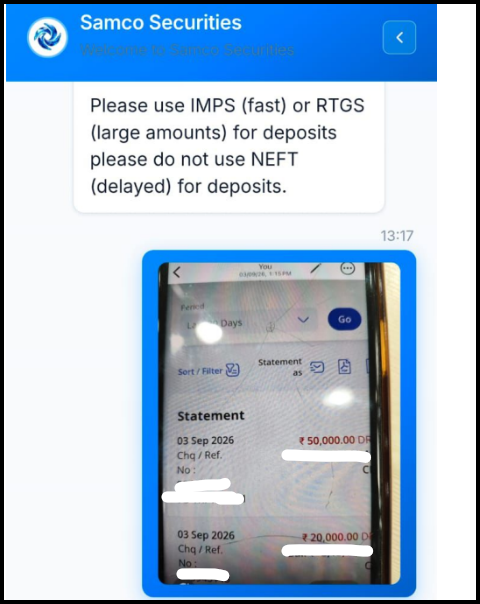
The victim sends bank statement proof of transfers of ₹50,000 and ₹20,000.
When the app blocked screenshots, the chat even suggested he pass this proof through his WhatsApp adviser, and you can see that exchange in our report on the Sam Pro customer care number.
One more detail deserves attention.
When he mentioned that his bank’s safety checks had limited his transfers to ₹2,10,000 in two days with a four-day cooling period, the admin suggested he visit the branch and do an RTGS at the counter.
Those bank limits exist to protect you.
When a stranger coaches you around your own bank’s safety checks, treat it as your strongest signal to stop.
Also Read: IndusInd Securities DMA Account impersonators used fake SEBI-backed setups to collect deposits by changing private accounts.
Sam Pro App Fake Portfolio Gains of ₹2.47 Crore
The dashboard is what keeps victims paying, because the numbers on it look life-changing.
This section covers what the screen showed and what happened when he asked for his money back.
The Sam Pro dashboard showed available funds of ₹2,47,40,458 and a total profit of ₹2,05,01,558. It even said his identity was already verified with his real name.
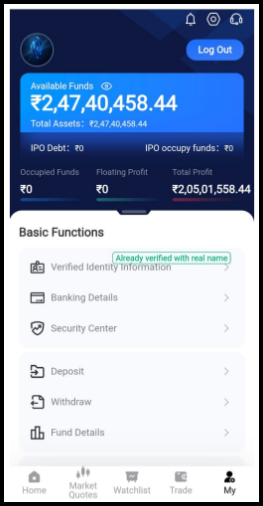
At one point, he placed a withdrawal request for ₹1,15,000.
Later, he wrote to the app’s support asking them to cancel it “as per advice of the investment adviser.” Support replied that it could submit the cancellation on his behalf.
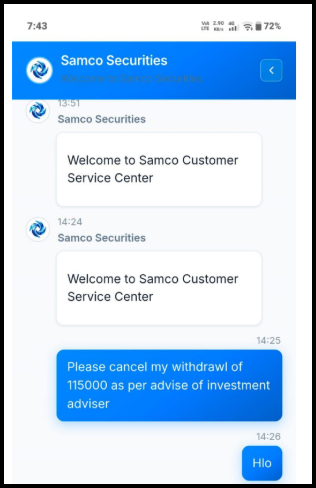
Put simply, the one person steering his trades also talked him out of taking money out.
To see how the ₹1,15,000 request was cancelled and what the support chat offered next, read our full account of the Sam Pro app withdrawal.
Meanwhile, the deposit requests kept getting bigger.
A genuine demat holding shows up in the consolidated account statement from NSDL or CDSL, which the depositories send you directly.
If your shares or profits never appear there, they exist only as numbers inside the app.
Did your Sam Pro balance keep climbing while every withdrawal got delayed, cancelled, or tied to one more payment?
We help investors put their transfers, chats, and screenshots in order and take the complaint to the right authorities.
Warning Signs of a Sam Pro App WhatsApp Group
If you are still sitting in one of these groups, go through the signs below one by one.
Seeing several of them together usually means the group exists to collect deposits, not to teach trading.
- A stranger reaches out first on Facebook and asks which stocks you hold before inviting you to a free group.
- The group promises fixed returns, such as 30 to 50 percent for a portfolio or 200 percent guaranteed through a special account.
- Admins control the chat, and members mostly post praise for a “Professor” rather than real questions or losses.
- You install the app by searching a name and entering an invitation code, instead of using your broker’s official app.
- Shares come at a discount to the market price. The Keep Growing group offered Larsen & Toubro “OTC” shares at ₹2,871 while the market price stood at ₹3,870.
- Payment goes to a private firm’s account instead of an account in the broker’s name, and the account changes with each deposit.
- Someone coaches you around your bank’s limits, such as going to the branch when online transfers get blocked.
- The adviser steers you away from withdrawing and toward adding more money.
- The rules demand secrecy and total obedience to instructions.
How to Check a Real SAMCO App or Any Broker App?
A two-minute check before installing any trading app would have stopped this case at the very first step.
Here is the quick routine worth following every time, whichever broker’s name appears in a group:
- Start with the Play Store listing. Open the app page, scroll to the developer name, and confirm it matches the broker’s registered company name exactly.
- Next, confirm the broker’s registration on the SEBI website’s list of registered intermediaries, and note down its official website.
- Then call the broker on the number printed on that official website, not on any number someone shared in a chat. Ask them to confirm the app name and whether they run any WhatsApp groups.
- Finally, before paying anything, check the account name. Genuine brokers accept funds only from your own bank account, into an account that carries the broker’s name.
How to Report the Sam Pro App Scam?
Speed matters more than anything else here, because banks can only freeze money that has not moved on yet.
Start with the steps that protect what is left, then build a complaint that stands up.
1. Act in the First Few Hours
These steps protect whatever money can still be traced. Try to complete them the same day you realise something is wrong.
- Stop all payments, including any “tax,” “unlock fee,” or “margin” the group demands before releasing a withdrawal.
- Call the cyber crime helpline 1930 and also file a report on the National Cyber Crime Reporting Portal.
- Inform your bank in writing, share every UTR number, and ask them to raise a request to freeze the receiving accounts.
- Keep the app installed and take screenshots of the dashboard, the deposit history, and every support chat.
- Watch for misuse of your Aadhaar and PAN, since you uploaded them during the app’s KYC.
Many victims lose precious days wondering whether to report at all, or which office to approach first.
If you want the full sequence, from the helpline call to bank follow-ups, laid out in one place, our guide on what to do if online fraud happens walks you through each step in the order that gives recovery the best chance.
2. Build Your Complaint With the Right Evidence
Police and banks move faster when every claim comes with proof attached.
Gather the following in one folder, and label each file with its date.
- The Facebook profile page and every private message from it.
- The info pages of each WhatsApp group, showing the name, member count, and admins.
- The install instructions, including the verification and invitation codes.
- The fake SAMCO approval form and the fake SEBI notice.
- Every app chat where support shared a bank account.
- Every debit SMS, UTR number, and bank receipt.
- Dashboard screenshots and any withdrawal request you placed.
It is also worth writing to SAMCO’s official support to report that someone is misusing its name. A written reply from the company confirming that it has no connection with the app can strengthen your police complaint.
A complaint with gaps in it can sit untouched for weeks.
Our step by step article on how to file a cyber crime complaint shows how to arrange these proofs, what details to write in the complaint, and how to follow up so your case keeps moving.
Disclaimer: This article relies on chat records, screenshots, and bank messages that a victim shared with us, with his personal details removed. It reports what those records show and does not accuse SAMCO Securities, its founder, or any holder of the bank accounts mentioned of wrongdoing.
Conclusion
The Sam Pro App case shows how carefully these groups build a story before they ask for money.
It starts with a Facebook analyst and moves on to a professor’s evening lessons, a pinned applicant form, a stamped approval, and finally a SEBI logo on a bank notice.
Each step borrowed trust from a real name, first SAMCO, then its founder, then SEBI itself.
The money, though, went into a string of unrelated current accounts, and it did so in about two weeks.
If any part of this story matches your own chats, stop further payments today, report the transfers, and save every screenshot before the group disappears.
Report. Recover. Stay Fraud Free.
In the case we reviewed, the app showed ₹2.47 crore in funds and profits. Meanwhile, the deposits went to unrelated private firms' accounts and the group guaranteed 200 percent returns. Compare your own records with the warning signs above, and verify with SAMCO directly before paying. SAMCO's official Android app appears on the Play Store as "Samco: Stocks & Recommendation," published by Samco Securities Limited. The records we reviewed show nothing that connects the company to Sam Pro, so the SAMCO branding in these chats points to impersonation. In the case we studied, the "adviser" steered the investor into cancelling his ₹1,15,000 withdrawal. Do not pay any fee or tax to unlock a withdrawal. Instead, report the case on 1930 and give your bank the UTR numbers. Recovery depends mostly on speed and evidence. If you report quickly, banks can freeze funds still sitting in the receiving accounts. Strong proof, including UTRs, the app's support chats, and group screenshots, improves your chances when police trace the money. Call the cyber crime helpline 1930 and file on the National Cyber Crime Reporting Portal. Inform your bank in writing with every transaction reference. Keep the app, the chats, and the approval papers saved as evidence for the police.Frequently Asked Questions





 Add us as a preferred source on Google »

