
Quick Summary
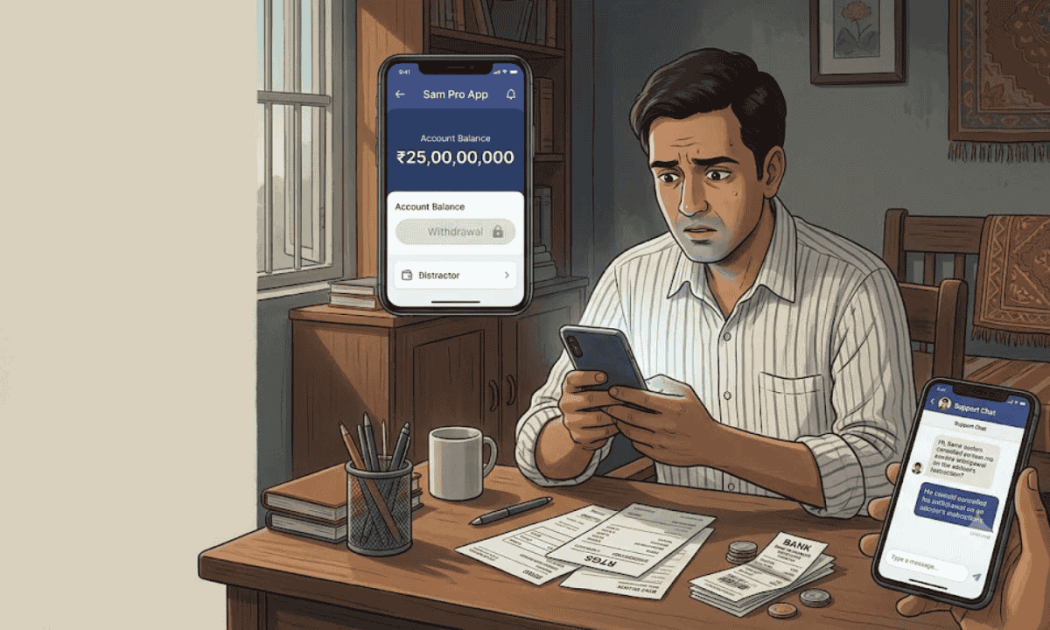
A Sam Pro App withdrawal of ₹1,15,000 is the only withdrawal we found in one investor’s records, and it never went through. He asked the app’s support chat to cancel it “as per advice of investment adviser,” and support offered to cancel it for him. Later in that same chat, he asked for an account to send ₹26,40,000 by RTGS. The app showed ₹2.47 crore in funds, but none of it was withdrawable money. Here’s why, and what to do next.
You opened Sam Pro App, saw a balance in crores, and tapped Withdraw.
Then someone you trusted told you to hold off, or cancel, or “wait for the next allotment.”
If that sounds familiar, you’re in the right place, and you’re not the first person to go through it.
We went through one investor’s full support chat and app screenshots.
Below, you’ll see what happened to his withdrawal, why the balance can’t simply be taken out, and what genuinely helps now.
You can also report financial fraud India to our team at any point.
Inside the Sam Pro Withdrawal Request: What Went Wrong
Let’s start with the one withdrawal on record, because the way it ended tells you a lot. Here’s the sequence from the app’s own support chat.
The investor had placed a withdrawal request for ₹1,15,000.
Then, inside the app’s chat titled “Samco Customer Service Center,” he wrote that it should be cancelled as per the advice of his investment adviser.
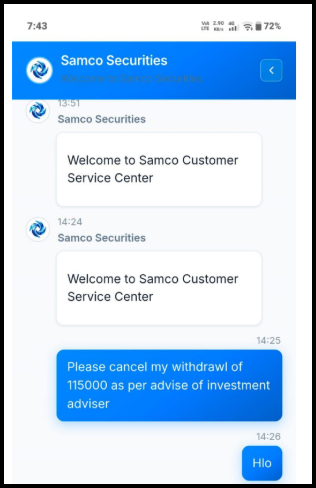
Support replied that he could cancel it directly inside the trading programme, and added that it could also submit the cancellation on his behalf.
Now look at what came next in the same chat.
He asked support for an account number to send ₹26,40,000 by RTGS. So the withdrawal went away, and a much bigger deposit took its place.
Also Read: Upstox IPO scam, and the credit standing threat that the page says an IPO application cannot trigger.
Why Can’t the Sam Pro Balance Simply Be Withdrawn?
The balance on screen is the reason people keep waiting. Here’s why that number doesn’t behave like real money.
The dashboard showed available funds of ₹2,47,40,458 and total profit of ₹2,05,01,558.
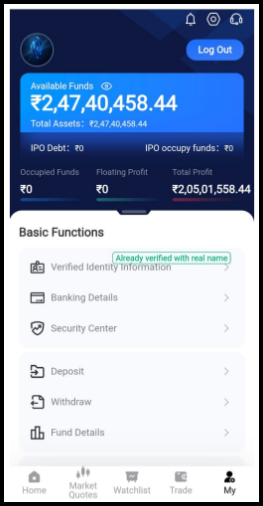
Yet the investor’s real transfers added up to roughly ₹30 lakh.
Every rupee he sent went by UPI, NEFT, or RTGS into current accounts of unrelated private firms, which the support chat assigned one by one.
The money left his bank at that moment. It never sat inside the app waiting for him.
That’s why pressing Withdraw can’t release it. The profit and the crores exist only as figures on the screen.
If you’d like the full story of how those deposits were collected, our breakdown of the Sam Pro app case covers every step from the first Facebook message.
Who Decides When You Can Withdraw from Sam Pro?
In a real broker account, you decide when to withdraw. In this case, someone else did, and the rules were set up that way from the start.
Before the account was even opened, the WhatsApp admin shared the “Primary Account” rules.
One of them required members to follow every instruction issued by the organisation.
Another barred acting in any way that harmed the group’s “collective interests.”
Put those rules next to the cancelled request, and the pattern is clear.
Taking your own money out becomes something you need permission for, and the permission keeps getting pushed back.
Has your Sam Pro adviser talked you out of a withdrawal, or told you to add more first?
Don’t send anything else yet. We help investors trace every transfer and take the complaint to the people who can act on it.
Sam Pro Withdrawal Demands: Tax, Fees, and Allotments Explained
In this case, the withdrawal was stopped by “advice.” In many similar app scams, the next move is a payment demand. Here’s what to watch for.
Interestingly, the group’s own rules stated that no fees are charged for deposits or withdrawals.
So if anyone now asks you to pay before releasing your money, they’re breaking the rules they gave you.
- A tax or “profit charge” to unlock your balance.
- An IPO or allotment amount you supposedly owe before you can withdraw. The dashboard even has fields called “IPO Debt” and “IPO occupy funds,” which showed zero here.
- A “verification” or “security” deposit to prove the account is yours.
- A fresh bank account to send that payment to.
Please don’t pay any of these. In cases like this, no such payment releases real money. It only adds to the loss.
How to Recover Money Stuck in Sam Pro App?
Since the money went to bank accounts, that’s where the chase happens.
These steps give you the best chance, and the order matters.
Step 1: Report Every Transfer on 1930
Call 1930 and file a written complaint on the National Cyber Crime Reporting Portal.
List every transfer, including small test amounts, with the date, amount, mode (UPI, NEFT, or RTGS), and the UTR or reference number.
RTGS slips from your bank branch matter a lot here.
They carry the receiving account details and the exact time of transfer, which helps banks act quickly.
Step 2: Ask Your Bank to Request a Freeze
Visit or write to your bank with the complaint number and every reference number.
Ask it to raise a fraud report and request a hold on the receiving accounts.
Banks and police move faster when your complaint is laid out clearly.
Our article on how to file a cyber crime complaint shows how to arrange the proofs and follow up so the case doesn’t stall.
Step 3: Save the Withdrawal Trail
Gather everything that shows your money was blocked or redirected. Keep it in one folder with dates.
- Screenshots of the dashboard, Withdraw page, and Fund Details.
- The support chat where the withdrawal was cancelled.
- WhatsApp messages from the adviser about withdrawing or waiting.
- Every support message that assigned a bank account.
- Your debit messages, RTGS slips, and bank statement.
What Not to Do While Your Sam Pro Money Is Stuck?
A few natural reactions can quietly make things harder. Keep these in mind over the coming weeks.
- Don’t delete the app or leave the WhatsApp groups before you’ve saved everything.
- Don’t place or cancel withdrawals on anyone’s instruction now.
- Don’t send money to “unlock” funds, whatever it’s called.
- Don’t trust strangers offering recovery for a fee.
Many people start hunting for a support number around now, and that search attracts its own set of fake helpers.
Before you dial anything, read our page on the Sam Pro customer care number to see who actually answers and where real help sits.
Disclaimer: This article relies on chats, screenshots, and bank messages that a victim shared with us, with his personal details removed. It reports what those records show and does not accuse SAMCO Securities, its founder, or any holder of the bank accounts mentioned of wrongdoing.
Conclusion
The only Sam Pro App withdrawal in this case was cancelled on an adviser’s advice, and a ₹26.4 lakh deposit came right after.
That’s the whole trick in one moment.
The balance keeps rising, the exit keeps closing, and the next payment always seems more urgent than getting your money back.
Your real trail is in your bank messages and RTGS slips.
Report them today, ask your bank for a freeze, and don’t pay a rupee more to anyone promising a release.
Report. Recover. Stay Fraud Free.
In the case we reviewed, the only withdrawal was cancelled on the adviser’s advice, and the money had already gone to unrelated firms’ bank accounts. The balance on screen isn’t money the app holds, so the withdraw button can’t release it. No. In the case we studied, the cancellation was followed by a much larger deposit. Don’t cancel or place requests on anyone’s instruction. Save the chat and report the case on 1930 instead. The group’s own rules said no fees apply to withdrawals. Any tax, allotment, or unlock payment demanded before release only adds to your loss. Report the demand along with the account it names. There’s no guarantee. Your chances depend on how fast you report and how much remains in the receiving accounts. Reporting on 1930 and alerting your bank quickly gives the best chance of a freeze. Keep the dashboard and withdrawal screenshots, the support chats that assigned bank accounts, and the WhatsApp adviser messages. Also keep every debit message, UTR, and RTGS slip from your bank.Frequently Asked Questions




 Add us as a preferred source on Google »

