
Quick Summary
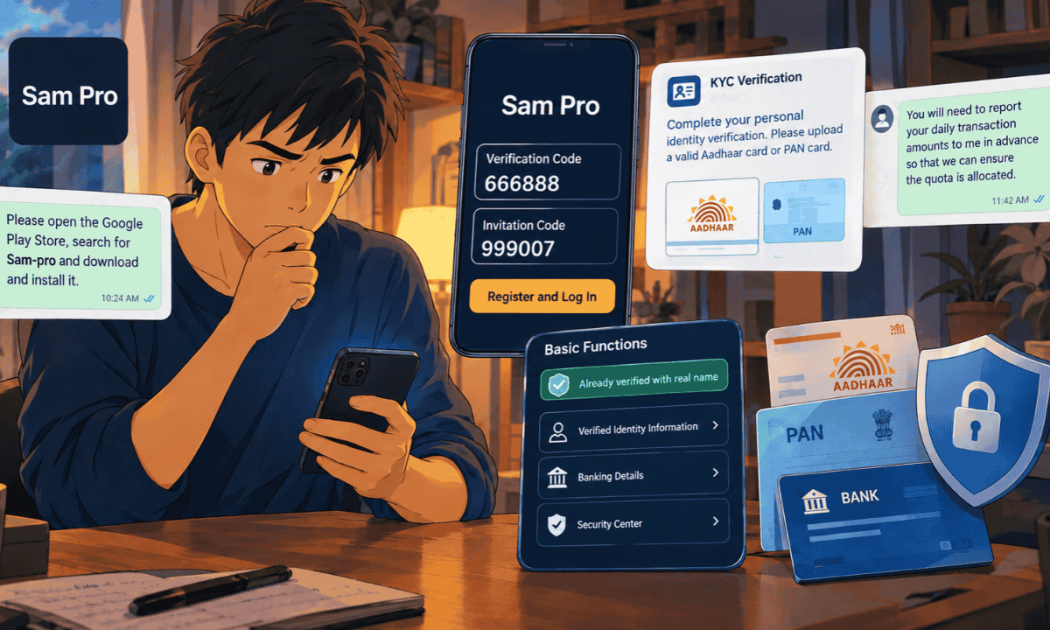
Sam Pro App login in the case we reviewed was set up step by step by a WhatsApp admin, using a verification code everyone shared (666888) and her invitation code (999007). Right after login, the app asked for an Aadhaar or PAN card upload, and later displayed “Already verified with real name” along with a Banking Details page. If you’ve signed up, your money isn’t the only thing at risk. This page covers what that login really means and how to protect your identity now.
Maybe you’ve just registered through the Sam Pro App login because a group admin walked you through it, or maybe you did it weeks ago and are only now feeling uneasy.
Either way, it’s worth pausing on one question most people skip. What exactly did you hand over when you logged in?
Below, we look at how the login was set up in one investor’s case, what the codes and badges actually mean, and the simple steps that protect your Aadhaar, PAN, and bank details.
If you need help, you can report financial scam India through us.
How Was the Sam Pro App Login Set Up?
The investor didn’t find this app on his own. Here’s a quick look at how he was guided to it, without repeating every step.
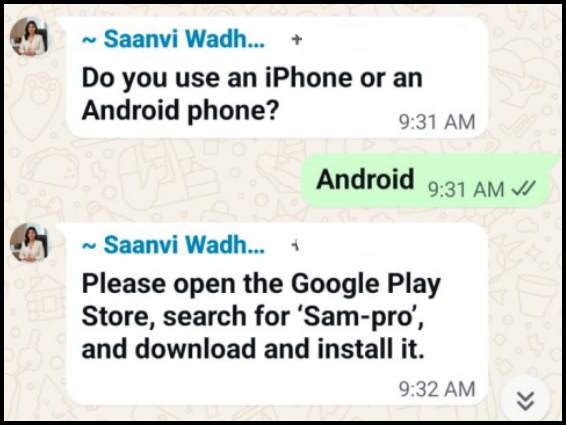
A WhatsApp admin first asked whether he used an iPhone or an Android.
By the time he reached the Sam Pro App login screen, the admin had already guided him to install the app from the Play Store.
From that point, every step of the signup happened inside the WhatsApp chat, with the admin telling him exactly what to enter.
Next came a short registration guide, ending with “Register and Log In” and a request to send her a screenshot so she could take him through KYC.
If you want the complete step list and how it fits into the wider scheme, our Sam Pro app case study lays it all out.

By the morning of 26 August 2026, he confirmed the app was open, and its home screen showed live-looking index numbers and a stock list.
Also Read: Upstox IPO scam, with the three stages from small block trade profits to a fake IPO bill.
What the Fixed Sam Pro Codes Tell You
The two codes in the guide look like routine security.
They’re actually the clearest clue about who controls the account.
1. Verification Code 666888
A real verification code is a fresh OTP sent to your own number, different each time.
Here, the admin already knew the code before he even entered his number.
If someone else can tell you your verification code in advance, nothing is being verified.
2. Invitation Code 999007
The invitation code came from the admin herself.
Codes like this usually link your account to whoever invited you, so they can see your activity and guide your next move.
That fits what the group asked for later.
The admin wanted him to report his daily transaction amounts to her in advance so the “quota” could be allocated.
Sam Pro KYC and the “Verified With Real Name” Badge
Right after login, the app moved straight to identity checks. Here’s what was collected and what the badge on the dashboard really shows.
The admin said she would guide him through KYC.
The app then asked him to upload a valid Aadhaar card or PAN card and tap OK once done.
Later, the dashboard showed a green tag saying “Already verified with real name” beside Verified Identity Information, along with Banking Details and Security Center options.
That badge sounds official, but it only means the app has stored your documents.
A real broker’s KYC is registered with a KYC Registration Agency, and you’d receive an SMS or email from that system confirming it.
The Banking Details page also kept his bank account and IFSC on file.
Keep that in mind, because those details now sit with whoever runs the app.
Already Uploaded Your Aadhaar or PAN? Steps to Protect Your Identity
This is the part that keeps working against you long after the deposits stop.
Here’s what to do if you’ve shared your identity documents:
- Lock your Aadhaar biometrics through the official UIDAI website or the mAadhaar app, so nobody can use your fingerprints or face for authentication.
- Check your Aadhaar authentication history on the UIDAI website for any use you don’t recognise.
- Check your credit report with a credit bureau over the next few months for loans or cards you didn’t apply for.
- Tell your bank that your details were shared with a suspicious app, and ask about extra checks on your account.
- Watch for SIM swap signs, such as your mobile network suddenly going dead, and contact your telecom operator immediately if it happens.
Uploaded your Aadhaar or PAN to Sam Pro and worried about what else could go wrong?
We’ll go through what you shared and what you sent, and help you report it the right way.
Registered on Sam Pro but Haven’t Deposited? What to Do Now
If you’ve signed up but not paid, you’re in a far better position.
Here’s how to keep it that way:
- Don’t make any deposit, even the ₹10,000 the group listed as the minimum working capital.
- Don’t upload Aadhaar or PAN if you haven’t already.
- Don’t share daily amounts with the admin or agree to any “quota.”
- Save the chats and screenshots, then leave the groups and block the contacts.
- Report the app and the numbers on the National Cyber Crime Reporting Portal.
If you haven’t been told yet, check the developer name before trusting any trading app that uses a broker’s branding.
SAMCO’s own app is published by Samco Securities Limited, and nothing in our records links it to Sam Pro.
Deposited Money After Sam Pro App Login: What Should You Do?
If money has already left your account, your priority shifts to the transfers. The steps are different, and time matters.
Start by calling 1930 and gathering every bank message.
Many people lose the first few hours deciding where to begin, so our guide on what to do if online fraud happens lays out the order clearly.
While you do that, keep the app installed and screenshot the dashboard, Fund Details, and every support chat that gave you a bank account.
Those screens tie your transfers to the app.
Once you’ve reported, your next worry will probably be the balance on the dashboard.
Our page on Sam Pro app withdrawal explains why it won’t come out through the app and what can still help.
Disclaimer: This article relies on chats and screenshots that a victim shared with us, with his personal details removed. It reports what those records show and does not accuse SAMCO Securities, its founder, or any other company of wrongdoing.
Conclusion
A Sam Pro App login set up with a shared code and someone else’s invitation isn’t really yours to control.
In this case, the login led straight to an Aadhaar or PAN upload, a “verified” badge, and a stored bank account, all before the big deposits began.
If you’ve signed up, protect your identity today, and if you haven’t deposited yet, stop there.
Your documents and your money both deserve that care.
Report. Recover. Stay Fraud Free.
In the case we reviewed, a WhatsApp admin guided the signup with a fixed verification code and her own invitation code. Before you log in or deposit, check the app’s developer name and the broker’s SEBI registration. It was the code the group admin gave for registration. Invitation codes like this usually tie your account to whoever invited you. Don’t use codes sent by strangers to open any trading account. Lock your Aadhaar biometrics on the official UIDAI website or mAadhaar app, check your authentication history, and keep an eye on your credit report. Report the app on the cyber crime portal. Logging in alone doesn’t move money, but the app collects identity and bank details, and a shared verification code means nothing is truly verified. Don’t deposit, and protect any documents you’ve shared. No. In the case we reviewed, the badge appeared after an Aadhaar or PAN upload inside the app. A real broker’s KYC is registered with a KYC Registration Agency, which confirms it to you by SMS or email.Frequently Asked Questions





 Add us as a preferred source on Google »

