
Quick Summary
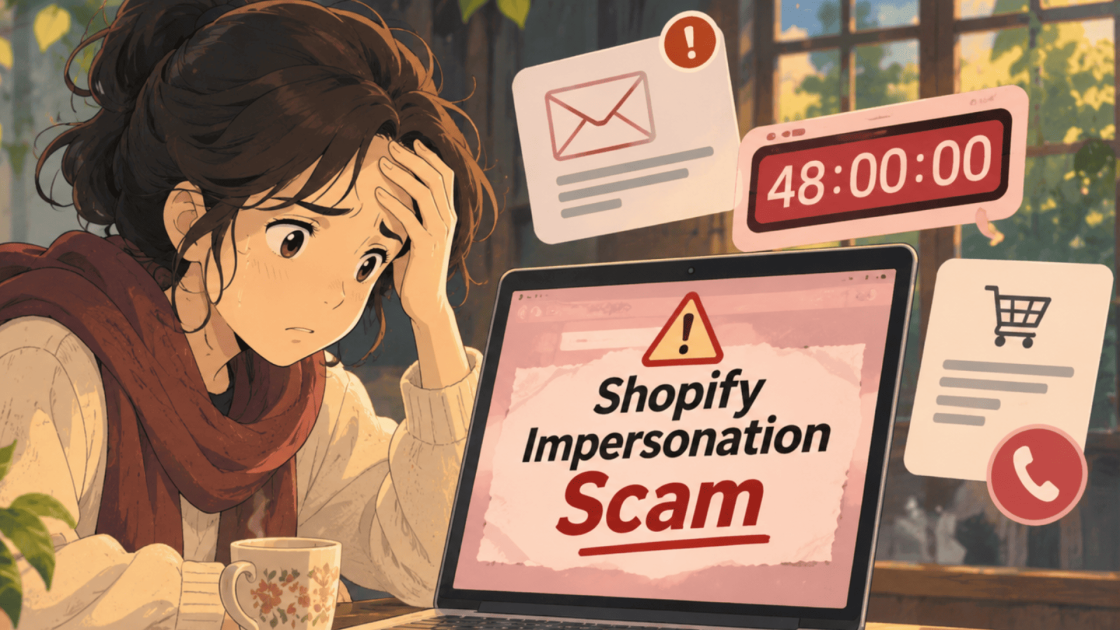
Scammers copy the Shopify name to trick both sellers and shoppers. Sellers report fake support calls, fake “Experts” emails, and urgent compliance alerts that ask for OTPs or remote access. Shoppers report fake stores, fake order receipts, and refund calls that lead to remote access tools and gift cards. This page explains how a Shopify impersonation scam works for each side, the signs to spot, and what to do if you lost money.
An email says your store will be shut down in 48 hours. A timer counts down beside a “verified” badge.
On the other side, a shopper gets a receipt for an order they never placed, with a number to call.
Both stories use the same borrowed name.
This post explains the Shopify impersonation scam so you can tell which message is real.
Shopify Impersonation Scam in India
Shopify is a platform that lets businesses build online stores, manage products and orders, take payments, and sell through social media.
Sellers and shoppers around the world see its name every day.
Fraudsters use that trust.
They pose as Shopify support, Shopify partners, or Shopify itself, and ask for passwords, OTPs, payments, or remote access to a computer.
It is one more form of impersonation scam, where a trusted brand is borrowed to make a request look official.
Which side are you on?
- I sell on Shopify. Read the section on scams targeting sellers.
- I bought from a Shopify store. Read the section on scams targeting shoppers.
- My store or photos were copied. Read the section on copied stores and cloned brands.
Is It Really Shopify? Three Signs a Message Is Fake
Before reading each scam, learn the three signs that appear again and again. This section keeps them short.
- A password or OTP request. Real Shopify support never asks for your password. Treat any such request as a warning sign.
- A countdown and a badge. A giant timer, a threat of termination, and a “verified” badge are pressure tools and not proof.
- A callback number or remote access request. Fake alerts push you to call a number or install remote desktop software.
Also Read: A ₹3 lakh withdrawal was blocked because of a “fallen credit score”, and the account manager then asked for a ₹4 lakh security deposit to unlock it, as reported in our Delta Exchange impersonation scam guide.
Shopify Impersonation Scam Targeting Sellers: Fake Support, Experts and Alerts
Sellers hold the login, the customers, and the money, so they are the main target.
This section covers the four traps reported most often.
1. Fake Shopify Support Calls and Messages
Impersonators call, email, or message sellers and claim the store is suspended or needs verification.
They then try to get one-time passwords or push the seller to install remote desktop software.
The first contact is usually a call or a chat from a number you do not know, so it helps to know how to check if a phone number is scam before you reply.
A real support team does not need your password or an OTP to fix a store.
2. Fake Shopify Experts Using Free Email Accounts
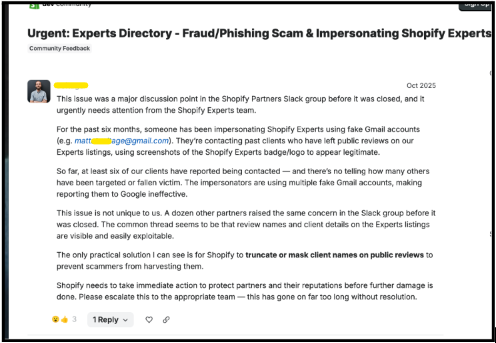
In October 2025, a Shopify partner posted that scammers were posing as Shopify Experts.
According to the post, they used free email accounts and screenshots of official badges and logos to look genuine.
The partner said at least six of their clients were contacted over six months, and that about a dozen other partners had raised similar concerns.
The poster believed the impersonators used client names and details visible on public review listings, and asked Shopify to mask those names.
These are the poster’s claims and not confirmed findings.
3. Shopify Trademark Compliance Email With a Countdown Timer
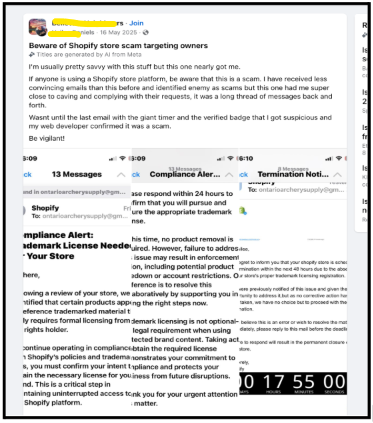
A Facebook post from May 2025 described a message headed “Compliance Alert: Trademark License Needed”.
A follow-up email warned that the store would be terminated within 48 hours, with a countdown timer and a verified-looking badge.
The poster said they nearly complied after a long thread of messages, and that a web developer confirmed it was a scam.
Pressure plus a timer is the point of this trick.
4. Inbox Flooding and Account Takeover
Some attackers flood a seller’s inbox with newsletter sign-ups.
The aim is to bury a real notification, such as a password reset or a new staff account being added, and then take over the admin account.
This one does not copy Shopify’s name, but it often arrives alongside fake support messages.
Check any new staff account or password change you did not make.
Also Read: One property owner was asked to wait 30 minutes for “satellite verification”, and an affidavit followed with a ₹2,500 “refundable” fee, as shared in our Airtel tower installation scam guide.
Shopify Scams Targeting Shoppers: Fake Stores, Fake Receipts and Refund Calls
Shoppers meet the Shopify name on store pages, order receipts, and app alerts. This section covers the three traps reported most often.
1. Fake Shopify Stores Selling Brand Goods at 70% Off
Scammers build professional-looking online stores offering brand-name goods, such as shoes or electronics, at around 70% off.
Victims report receiving cheap plastic items, counterfeit goods, or nothing at all, after which the store disappears.
A store built on a platform is not proof that the platform checked the seller.
2. Fake Order Receipts and Refund Calls Using the Shop App
Attackers are reported to use the Shop App’s own messaging to send fake order receipts and alerts with a callback number.
Calling that number leads to a remote access trap, where the caller asks you to install a screen-sharing tool and later asks for gift cards or wire transfers as a “refund”.
Never install remote software for a caller, and never pay a refund using gift cards.
3. Cash on Delivery Orders That Arrive as Something Else
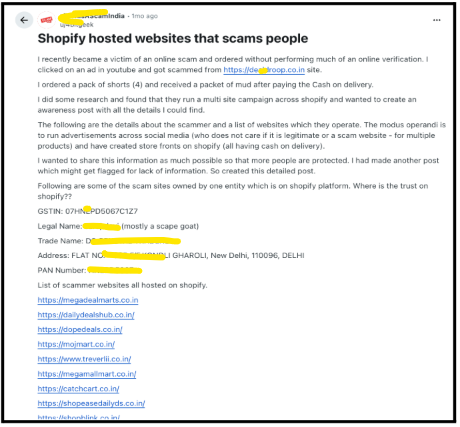
One Indian shopper posted that they clicked a video ad, ordered a pack of four shorts with cash on delivery, and received a packet of mud.
The poster alleged the same operator ran many storefronts across social media ads.
Names and website addresses are left out here, since these are one person’s claims.
Whether you pay upfront or on delivery, check the store’s reviews and contact details first.
Copied Stores and Cloned Brands: When Someone Copies Your Shopify Site
Sometimes the copy is the scam. This section covers sellers whose stores, photos, and details were lifted.
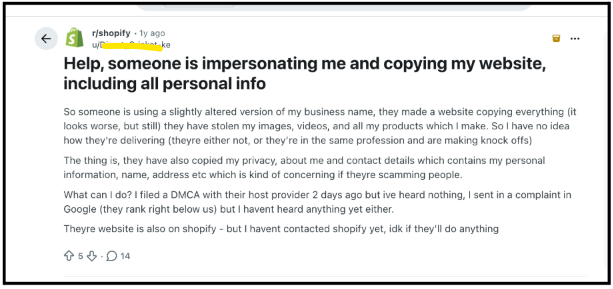
A seller on a forum said someone used a slightly altered version of their business name, copied their images, videos, and products, and also copied the privacy, about, and contact pages with personal details.
They said they had filed a copyright takedown with the host and a complaint with Google.
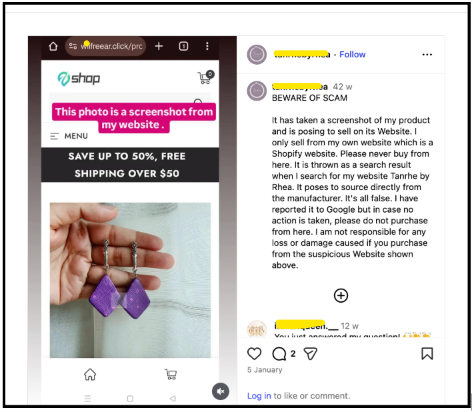
A small brand owner posted a warning that a site had taken a screenshot of her product and posed as selling it.
She asked customers not to buy from the copy and reported it to Google.
If this happens to you, save screenshots, report the copy to the platform and search engine, and warn customers through your official pages.
Also Read: An email says Galaxy will hold your crypto deal in escrow, but the company says it does not provide any escrow service, as explained in our Galaxy digital impersonation fraud guide.
Quick Checks Before You Click or Pay on Shopify Messages
A few habits stop most of these traps. The table below sets the checks for sellers beside the checks for shoppers.
| Check | If you sell | If you shop |
| Who is contacting you | Open your admin through the official site, not a link in a message | Buy only from stores you can verify through reviews and contact details |
| Password or OTP request | Never share it, even with “support” | Never share it for a “refund” or “verification” |
| Remote access | Do not install screen sharing tools for a caller | Do not install them to get a refund |
| Urgent timers | Treat deadlines and “verified” badges as pressure | Treat “only today” deals and 70% discounts as pressure |
| Payment method | Do not pay “compliance” or “licence” fees by message | Never pay refunds or fees with gift cards or wire transfers |
If any row feels familiar, stop and verify through a separate channel before you act.
Shopify Impersonation Scam in India: What to Do After Losing Money
If money has left your account or you gave access, act quickly. This section gives the order to follow for both sellers and shoppers.
Knowing what to do if online fraud happens early makes a real difference, so start the steps below as soon as you spot a problem.
- Stop all payments. Do not pay any “release”, “licence” or “refund” fee.
- Save the evidence. Keep emails, chat screenshots, order receipts, call numbers and transaction IDs.
- Call straight away. This is the national cyber fraud helpline, and early reports give banks more time to act.
- Contact your bank or card issuer. Ask about blocking the payment or raising a dispute.
- File a complaint online. Use the national cybercrime portal and submit your evidence to file a cyber crime complaint in India.
- Secure your store if you are a seller. Change your passwords, turn on two-step login, remove unknown staff accounts and apps, and uninstall any remote access tool.
No one can promise that money will come back. Quick reporting only gives you the best chance of the right agencies acting.
Lost money to a fake Shopify message or store and unsure where to start?
Some of these losses are small, and some are large. Our team reviews cyber fraud cases of ₹30,000 and above, and a clear record of payments helps a lot. If your loss is in that range, register with us, and we will go through your case with you.
Disclaimer: This page describes fraudsters who use the Shopify name. Shopify is a real platform and is not accused of any wrongdoing here, and this post relies on public reports and user posts.
Conclusion
Shopify is a real platform, and fraudsters borrow its name to look official. The fake calls, emails, receipts, and stores are the problem.
A real support team does not ask for your password, an OTP, or remote access.
If a message does, stop, verify separately, and report it.
Report. Recover. Stay Fraud Free.
Frequently Asked Questions
No. Shopify is a real platform. The scams are people using its name, or using stores built on it, to deceive sellers and shoppers.
No. Real Shopify support never asks for your password, so any message that does should be treated as fake.
Look for countdown timers, termination threats, "verified" badges and requests to call a number or install software. Open your admin through the official site instead of the email link.
Disconnect from the internet, remove the tool, change your passwords from a safe device, and call your bank.
No one can promise it. Reporting quickly gives banks and agencies the best chance to act.



 Add us as a preferred source on Google »