
Quick Summary
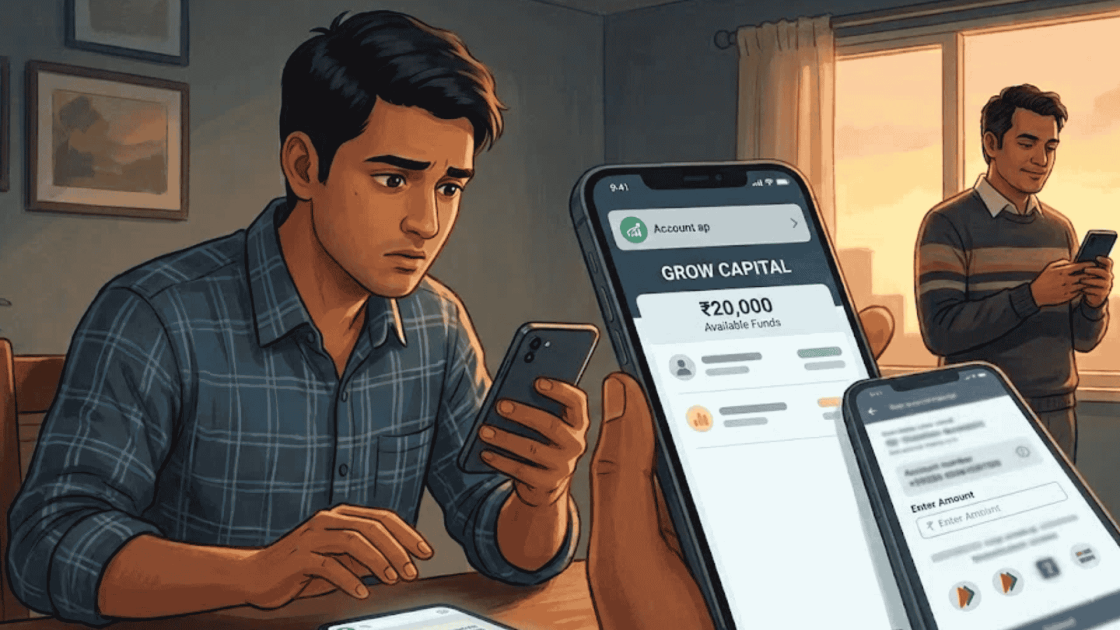
Grow Capital App login details, in the case we reviewed, didn’t come from a sign up form the trader filled in himself. A WhatsApp contact called “Girish Ji Trade Fund” set the account up a day after a tipster passed on his number. Five days later came the first payment request, and the login screen soon showed ₹20,000 as available funds. If someone has just sent you this app or a login ID, this page shows what to check before you pay a single rupee.
Maybe a tips contact just told you to call someone who will “open your account,” or maybe you’re holding a fresh Grow Capital App login and wondering whether to add money.
Either way, you’re at the best possible moment to pause, because nothing has left your bank yet.
We studied one trader’s chats from the day his account appeared to the day his first payment went out. Below, you’ll see how that login reached him and the signs that can save you.
If you already feel something is off, you can report financial fraud India through us right away.
How Does a Grow Capital App Login Get Set Up?
In a normal broker app, you download it, fill in your own details, and finish KYC yourself.
Here’s how the Grow Capital account came about instead, step by step.
On 25 August 2026, a tipster contact saved as “Rajesh Patel Trade” shared a number for someone called Girish.
He told the trader to call and say that “Paresh bhai” had given the number to open an account.


The very next day, 26 August, the account’s fund ledger shows its first entry, a zero balance. In other words, the account existed before the trader had paid anything.
Then, on 31 August, the “Girish Ji Trade Fund” contact sent him a screenshot of his account page with ₹20,000 as available funds.
The note with it asked him to start trading and call if any issue came up.

A registered broker never needs a referral code line or a middleman to open your account. You apply yourself, the broker verifies you, and your login comes straight from the broker.
Also Read: Sam Pro App Login: What Happens After You Sign In?
Who Controls Your Grow Capital Login ID & Password?
This is the part most people don’t think about. If someone else created your account, they may know everything you know about it.
The account page in this case had a Change Password option, along with Profile, Funds, Withdraw Funds, Deposit Request, Download Report, Customer Support, and Rules of Trading.
Changing the password may feel like taking control, but it doesn’t change who runs the app.
The people who set up the account also run what the app shows, including your balance, your trades, and your profit.
So the real question isn’t “is my password safe?” It’s “who is on the other side of this login?”
If the answer is a WhatsApp contact rather than a company you can verify, treat every number on that screen with suspicion.
Grow Capital App Download: Official Store App or WhatsApp Scam?
A lot of people type “grow capital app download” to find the app or to check it out. The name, though, leads to more than one place, so let’s clear that up.
The chats we reviewed don’t show a store link for this trading app. The account came through the WhatsApp contacts, and the screens came to the trader as screenshots and later on his own phone.
If you search app stores for “Grow Capital,” you may also find a different app with a similar name, for example, a real estate app on the Apple App Store published by Javin Enterprises Private Limited.
Nothing in our records links that app to this case.
The name also sounds a lot like Groww, a well-known broker. Again, nothing in these records connects the two.
If you want Groww, get it only from your phone’s official store and check that the developer name belongs to the company behind Groww.
Quick rule. Before installing any trading app someone sends you, look up the broker’s registration on the SEBI website and download only the app that broker lists on its official site.
Your First Deposit After Grow Capital Login: Where Does the Money Go?
Right after the login comes the first payment request, and this is where the real money starts moving. Here’s what that looked like.
On 31 August, the contact sent bank details labelled “Grow capital, IndusInd bank.” When the trader shared a payment screenshot, the reply was that he had used the wrong bank and should pay to IndusInd instead.
His payment screen at that moment showed a “Banking name” that had nothing to do with trading: the name of an unrelated business.
He paid ₹20,000 anyway, and that same amount then appeared in the app as available funds.

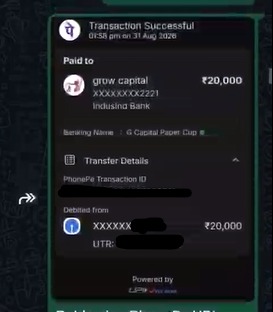
Seeing your exact deposit show up on screen feels reassuring, and that’s precisely the point. It proves only that someone typed the number in.
It doesn’t prove your money reached a broker or an exchange, which is how most fake trading app scams keep victims depositing.
Grow Capital App: Critical Verification Steps Before Sending Money
If you’re holding a new login and haven’t paid yet, these five quick checks will tell you a lot.
Each one takes a minute, and a single “no” is reason enough to hold back.
- Did you fill in the account form and KYC yourself on the broker’s own app or website?
- Did your login ID come from the broker by official SMS or email, rather than as a WhatsApp screenshot?
- Does the app show a company name and SEBI registration number that you can look up on SEBI’s website?
- Is the bank account you’re asked to pay in the broker’s own name, matching the company you just verified?
- Does support give you a ticket number, an email, or a grievance officer, instead of just a personal phone contact?
If you’re unsure who answers behind the Customer Support option, see our note on the Grow Capital customer care number.
Just got a Grow Capital login from a WhatsApp contact and a bank account to “start trading”?
Send us what you’ve received before you pay. We’ll go through the chats with you and tell you what we see.
Logged In to Grow Capital but Haven’t Paid Yet? Do This Immediately
This is the luckiest place to be in this whole story.
A few simple moves now can keep it that way.
- Don’t send any money, not even a small “activation” or “margin” amount.
- Don’t upload Aadhaar, PAN, or bank documents if the app or the contact asks.
- Save the chats and screenshots anyway, since they can help others and the police.
- Report the numbers that contacted you on the National Cyber Crime Reporting Portal under suspicious activity, using our guide on how to file a cyber crime complaint.
- Block the contacts once you’ve saved everything.
If you’d like to see how the same setup played out for a trader who did fund his account, our full Grow Capital app review walks through it from the first message to the last.
Sent Money to Grow Capital? How to Initiate Recovery Immediately
If money has already gone out, the steps change. Your login is no longer the issue; your payments are.
Keep the app installed, record every screen, and act on your UPI payments quickly.
Our page on grow capital app withdrawal lays out exactly what to do, in order, once the money has left your account.
Disclaimer: This article relies on chats, payment receipts, and screen recordings that a victim shared with us, with his personal details removed. It reports what those records show and does not accuse Groww, Javin Enterprises Private Limited, or any holder of the bank accounts mentioned of wrongdoing.
Conclusion
A Grow Capital App login that someone else sets up for you isn’t really your account, whatever name sits at the top of the screen.
In the case we studied, the referral line, the ready-made account, and the “wrong bank” correction all came before a single trade.
If you’re at that stage now, you still hold all the cards.
Verify the broker, refuse to pay, and keep the proof safe.
Report. Recover. Stay Fraud Free.
In the case we reviewed, a WhatsApp contact set up the account and shared the details, so there was no normal sign up. Before you log in or pay, check the broker's registration on SEBI's website. Logging in alone doesn't move money, but the people who set up the account control what it shows. Don't deposit, don't upload KYC documents, and save your chats if a contact gave you the login. The chats we reviewed show no store link for this trading app. A different app with a similar name exists on the Apple App Store, and nothing links it to this case. Only use apps listed by a SEBI registered broker. The account page does show a Change Password option. Changing it doesn't change who runs the app or its numbers, so it won't protect money you send. Stop payments and verify the broker first. Don't pay anything, don't share documents, and save every chat and screenshot. Report the numbers on the National Cyber Crime Reporting Portal, then block the contacts.Frequently Asked Questions




 Add us as a preferred source on Google »

