
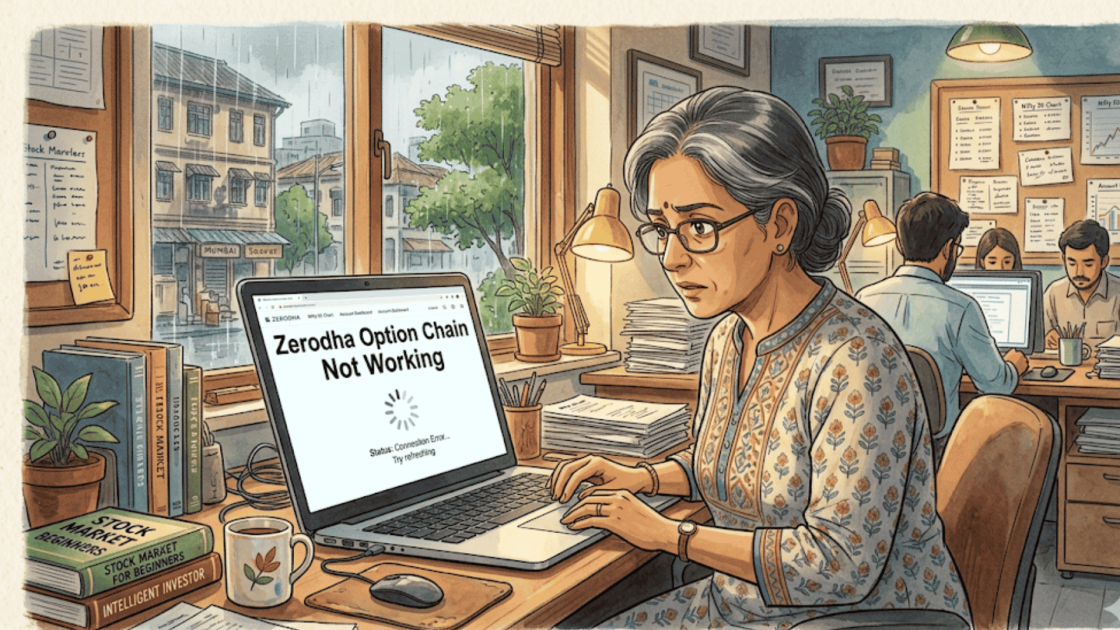
You’re staring at the screen. It’s 9:17 AM. The market just opened, Nifty is moving fast, and your option chain is blank.
You scroll, refresh, close the app and reopen it. Still nothing. Meanwhile, the strike you had your eye on has already moved 30 points.
By the time the chain loads, the opportunity is gone, along with part of your capital.
If this scenario sounds familiar, you are far from alone. Hundreds of Zerodha users search for “Zerodha option chain not working” every single week.
This isn’t just a random bug. It’s a pattern, one that shows up during exactly the worst moments for any options trader.
In this blog, we break down why the Zerodha option chain stops working, what real traders have experienced, what the actual causes are, and what you can do when it happens to you.
Zerodha Option Chain
The option chain is not just a feature inside Kite; it is the central tool for any options trader.
It shows all available strike prices, their premiums, open interest, volume, and option Greeks like Delta, Theta, and Vega, all updated in real time.
Without it, trading options is like driving without a dashboard.
You can’t see where liquidity is sitting, how the market is positioned, or what the risk profile of any particular strike looks like.
Zerodha recently revamped its option chain on both Kite Web and the Kite mobile app, moving it away from its earlier dependency on Sensibull and bringing it fully in-house.
For many traders, this was a welcome upgrade. But the shift also brought new reliability concerns, especially during high-traffic market hours.
Why is Zerodha Option Chain Not Working?
The Zerodha option chain doesn’t fail randomly. Based on user complaints and verified incident reports, the issues tend to cluster around a very specific set of market conditions:
- Weekly and Monthly Expiry Days: When everyone is scrambling to place or exit positions, server load spikes and the option chain is often the first thing to freeze or lag.
- 9:15 AM to 9:45 AM: The first thirty minutes of trading are when system pressure is highest. This is also when most options traders are most active.
- Major macro events: Budget days, RBI policy announcements, global news events, anything that drives sudden volatility also drives a surge in platform usage.
- Cloudflare and CDN outages: Because Zerodha’s infrastructure depends on third-party services, an outage at their CDN provider can bring down live price feeds and the option chain display simultaneously.
This is not speculation. On September 3, 2025, Zerodha Kite experienced a confirmed glitch that froze prices and watchlists for over 30 minutes right at market open.
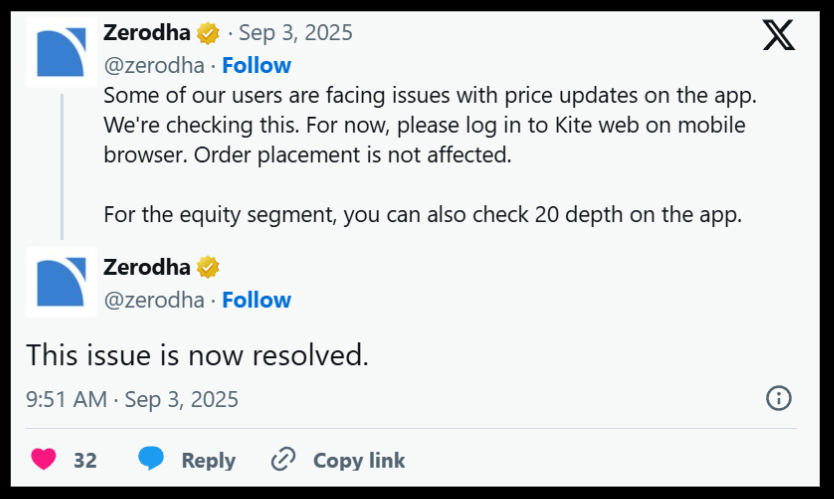
Traders couldn’t track live prices, positions weren’t updating, and the option chain was effectively unusable for a critical window. Zerodha acknowledged the issue publicly on X (formerly Twitter).
Zerodha User Complaints
The issue of the option chain not working on Zerodha isn’t limited to isolated glitches.
Multiple traders have reported recurring problems that directly impact execution, decision-making, and ultimately, profitability.
Below are some key categories of complaints based on real user experiences and what they actually mean at a deeper level.
Category 1: Order Execution Delays Due to App Lag
Problem: Orders placed during market open fail or get delayed due to app lag.
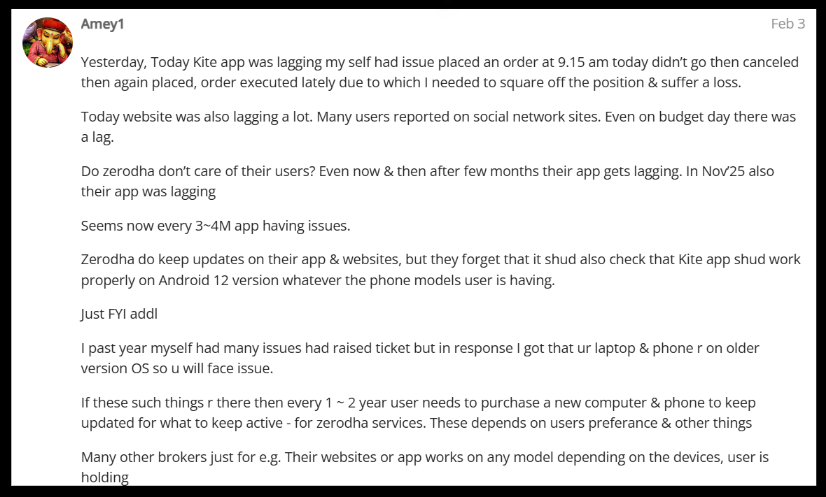
When the app or option chain lags, traders are unable to enter positions at the intended price. In fast-moving markets like Nifty or Bank Nifty, even a few seconds’ delay can turn a profitable trade into a loss.
Users reported placing orders at 9:15 AM that executed much later, forcing them to square off at unfavourable prices.
At a broader level, this creates execution risk, where strategy becomes irrelevant because the platform itself fails to respond in real time.
For options traders, this can mean missing key breakouts or getting trapped in volatility spikes.
Category 2: Option Chain Data Refresh & Freeze Issues
Problem: Market depth and option chain data do not refresh in real time, sometimes freezing for minutes.

Users highlighted cases where even after order execution, the option chain and market depth remained unchanged for up to 5–6 minutes. During such freezes, LTP (Last Traded Price), OI, and bid-ask data become unreliable.
The impact is significant: traders rely on real-time option chain data for decision-making, especially for scalping or intraday strategies.
A delayed or frozen screen means decisions are made on outdated data, increasing the probability of wrong entries and exits.
Category 3: Restricted Orders Due to OI Limits
Problem: Buy orders for certain option strikes are blocked, often mistaken as a platform error.
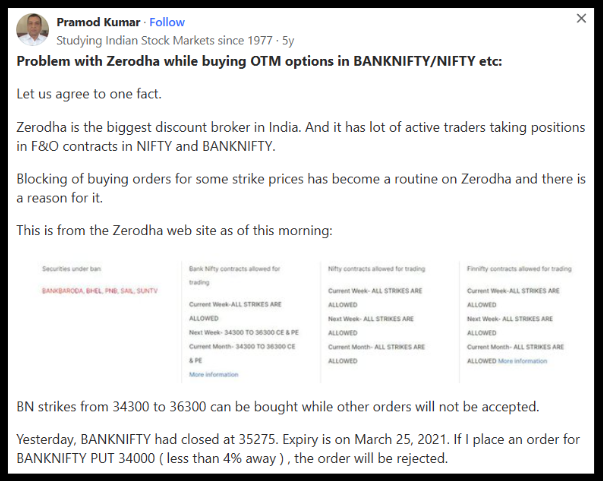
Many traders encounter messages stating that buy orders are restricted for specific strikes. This is often misunderstood as the option chain not working.
In reality, it is due to regulatory limits set by the Securities and Exchange Board of India on Open Interest (OI).
Since Zerodha has a large user base, it frequently hits these limits on popular contracts.
The outcome is that traders cannot take positions in certain strikes, leading to missed trades and confusion, especially for those unaware of regulatory constraints.
Common Option Chain Issues on Zerodha Kite
Traders have reported a range of distinct problems, each with a slightly different cause and resolution path:
- Option chain not loading at all: Usually happens during peak market hours or expiry days. The chain shows a loading state indefinitely or throws an error. This is typically a server-load or CDN issue.
- Option chain data not refreshing: The chain loads but prices are stale. Strike premiums don’t update. This is one of the most dangerous scenarios because traders may make decisions based on outdated information.
- Blank screen on mobile: Usually device-side (WebView issue), but can also occur during platform outages.
- Specific strikes missing from the chain: Can happen when F&O contracts for a particular stock have been suspended, lot sizes have changed, or the contract is close to expiry and settlement. It can also happen if the stock has been moved to the ASM or GSM surveillance list.
- Buy order rejected from option chain: Most commonly the OI limit restriction described above. The chain displays fine, but the order placement fails.
- Option chain showing incorrect OI or volume: Intermittent data feed issues from NSE can cause this. The problem often resolves itself, but it can mislead traders in the short term.
How To Complaint Against Zerodha?
If you find yourself in the middle of a session with a frozen or non-functional option chain, here is a clear set of actions to take:
Step 1: Capture Evidence Immediately
The moment you notice the issue, take screenshots. Capture the blank or frozen option chain screen, your open positions, the time, and any error messages.
This is your primary documentation if you need to escalate later.
Step 2: Verify Whether the Problem Is Platform-Wide or Device-Specific
Check Zerodha’s official status page and their X (Twitter) handle (@zerodhaonline).
Also check TradingQnA and Zerodha’s Market Intel bulletin. If others are reporting the same issue, the problem is on Zerodha’s side. If no one else is affected, try the steps below.
Step 3: Try Quick Technical Fixes
Switch between Kite Web and the Kite mobile app. Try a different internet connection. If on the mobile app, update Android System WebView. On the web, check that third-party cookies are enabled in your browser settings.
These resolve a surprising number of cases.
Step 4: Contact Zerodha Support
If the issue is ongoing and affecting your trades, reach out to Zerodha’s support team via their ticketing system.
Provide the exact time, screenshots, and your account details. Always get a written acknowledgment.
Step 5: Lodge a Complaint in SCORES
If Zerodha does not resolve your complaint adequately, the next step is to file a complaint through the SEBI SCORES platform.
This formally places your grievance on the regulatory radar. SEBI requires brokers to respond with an Action Taken Report on every complaint filed through SCORES.
Step 6: File a Complaint in SMART ODR
If the dispute involves a quantifiable financial loss and remains unresolved, India’s SMART ODR (Online Dispute Resolution) portal is available for securities market disputes.
The process begins with conciliation and can proceed to binding arbitration in the stock exchange if needed.
Need Help?
Register with us, and get help with the Zerodha option chain not working issue.
Our team will guide you to document the Zerodha complaint to SEBI and also help in representing your case in arbitration.
Conclusion
The Zerodha option chain not working is not always a simple technical glitch. Sometimes it is a device-level issue.
Sometimes it is a platform outage. And sometimes, as thousands of traders have experienced, it is an order block driven by SEBI-mandated OI limits that Zerodha doesn’t always communicate with enough clarity.
What is consistent across all these scenarios is this: when a platform issue occurs during market hours, the trader bears the immediate cost. The market doesn’t wait.
Understanding why the option chain fails, what the OI restrictions mean, and how to escalate properly when you’ve suffered a loss, these are not optional pieces of knowledge for active traders. They are part of the job.
Stay prepared. Document everything.
And if you’ve already suffered a loss due to platform issues that were not your fault, the grievance mechanisms described above are available to you, and using them is the right thing to do.





 Add us as a preferred source on Google »

